
In my previous article, Macintosh System Fonts, I surveyed the fonts that have shipped with the Mac OS and suggested that people without printers use a bitmapped font called Espy for everything on their system. Now I’d like to give a little more information about Espy.

More About Espy
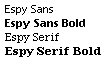 Choosing a favorite font is sort of like choosing a favorite flavor of ice cream. Opinions differ, and no amount of arguing will prove which one is the best. So how do I dare suggest that everyone consider using Espy? Sure, I love Espy, but that is hardly a reason to consider it. As a medical student, I’ve learned to recognize anecdotal evidence when I see it – even if I am the anecdote.
The popularity of Espy goes far beyond my opinion. The best evidence in favor of this font can be found on Damon Clark’s web site [no longer online].
Damon was one of the creators of the Espy fonts. When it became clear that Apple was not going to use Espy in Mac OS 8, a petition on the Net garnered 2,500 supporters trying to reverse Apple’s decision.
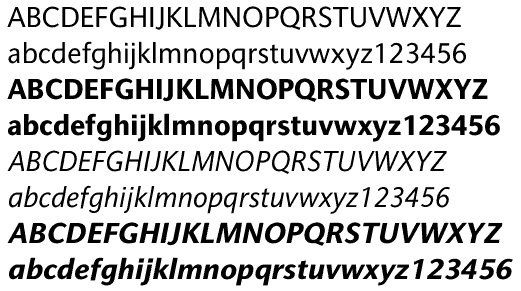
Nu Sans by Marty Pfeiffer
Because so many people liked Espy fonts and wanted to use them for printing, a shareware author named Marty Pfeiffer has provided ever improving TrueType fonts called Nu Sans and Nu Serif modeled on Espy Sans and Espy Serif. For $12 you get Nu Sans and Nu Serif in regular, bold, italic, and bold-italic versions.
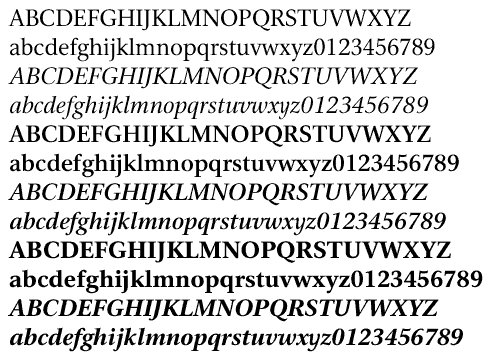
Nu Serif by Marty Pfeiffer
While having a TrueType version is great for printing, I don’t think I will ever buy it. There are some advantages to having a bitmapped font like Espy. Foremost, Espy is hand designed to be the best it can be at each particular size. Marty’s fonts emulate Espy’s 10 point size but miss out on some of the details that make Espy look so good at other sizes. Second, Espy fonts are free, and $12 could buy me a Mac IIsi nowadays. [Update: Nu Sans and Nu Serif have been improved over time – the image below is from version 4.1 of each. Both fonts are at version 9.7.2 in Sept. 2016.]
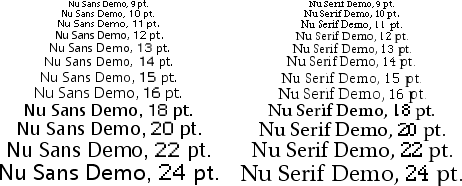
Nu Sans and Nu Serif 4.1 sample text
How to Use Espy
Before looking at some of the difficulties for using Espy, let’s look at some easy ways to incorporate it into your use. Many applications have a preference for which font to use in displays. If you use the menu bar clock from the Date & Time control panel, you can set that to Espy. The Finder has a view font that you can set. (I’d be more specific, but it is in several different places depending on what version of the Mac OS you use.)
There are two fonts that are not as easy to change. First, the Mac has a large system font. This font was traditionally Chicago, but Mac OS 8 started the introduction of other large system fonts, especially Charcoal. Second, there is a small system font that has always been Geneva.
The original way to change the large font in System 7 was through a $10 shareware program by Greg Landweber called Aaron. Aaron gives System 7 Macs the appearance of Mac OS 8. It’s also possible to use the Appearance extension from Apple on those Macs, but Aaron does a better job of making the change. To set the Appearance extension to use Espy for your System font, you need to do some editing with ResEdit. You can find a kit to help you on the hyperarchive.
In Mac OS 8 and later, you are required to use the Appearance Extension, so Aaron doesn’t work.
To change Geneva, there used to be an extension called Aaron Font, but it seems to have disappeared from Internet archives. Eric Dorland wrote this tiny freeware that substitutes Espy for Geneva. Although it worked in some places, it never really completely got rid of all the Geneva, because many older applications have Geneva hard-coded inside.
Next time I hope to explain some of my tricks for using Espy when browsing the Web.
Sources for Espy and Espy-like Fonts
- Boston Omnis FTP Download Index for Espy Sans and Espy Serif.
- Download espy.sea from Low End Mac.
- The Nu Font Pack by Marty Pfeiffer. Nu Sans and Nu Serif are based on Espy Sans and Espy Serif, respectively, and have been improved over the years. Available in both TrueType and Postscript versions. Plain font available as freeware.
- Epsy Sans, TrueType and Postscript Type 1 adaptations of Apple’s Espy Sans font. Free.
- Espy Sans, free TrueType font, U-fonts.
Keywords: #espy #espyfont #espysans #espyserif #nusans #nuserif
Sort link: http://goo.gl/jB9Yyt
searchword: usingespy
