
In A History of Font Technologies, I talked a bit about font technologies on the Mac. If you are unfamiliar with terms like “bitmapped” or “outline” fonts, you might want to read that article first. Here I am going to discuss the fonts that Apple has shipped with the Mac. I am on my way to an unusual suggestion that I hope you will consider.

When the Macintosh first shipped, it had a number of bitmapped fonts. Back in 1990, when I started working with Macs, there were a number of standard fonts that are still familiar today, such as Chicago, Geneva, Helvetica, Palatino, and Times. These shipped with System 6 and earlier versions of the Mac OS.
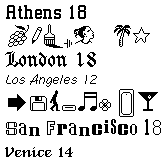 But early Macs also had a bunch of funky fonts that gave the Mac loads of character. There were dingbat fonts (picture fonts) like Cairo and Mobile. The San Francisco font, which looked like a ransom note, lent itself to playful documents. The Venice font was a favorite of many, since it was an easy to read script-like font.
In 1991, System 7 introduced TrueType fonts that were scaleable to any size. Apple did not make TrueType versions of all of the funky fonts, but they did make versions of the more businesslike fonts, such as Helvetica and Palatino. After a few years of transition, nearly everyone uses only outline fonts like TrueType or PostScript.
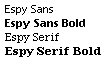 In System 7.5, Apple introduced its last bitmapped fonts – Espy Sans and Espy Serif. These fonts were designed to look good on screens. Apple made these fonts for its Newton PDA and used them for its fated online service called eWorld. Around that time there were screen shots of the next generation Mac Operating System; it used Espy Sans Bold for it’s system font instead of Chicago.
You might be saying to yourself, “Wait! I’ve had System 7.5 on my Quadra for years, and I’ve never seen any Espy Sans font.” This font wasn’t installed in the Fonts folder inside the System Folder. Instead, it was inside the Apple Guide and could only be released for general use by using a program like ResEdit.
 With Mac OS 8, Apple introduced an alternative system font named Charcoal. It was a TrueType font that looked a little bit like a cross between Chicago and Espy Sans Bold – people were expecting Espy as the new System font. Hidden inside the Appearance Manager that provided Charcoal, was the hint of future system fonts that finally showed up in System 8.5 like Gadget, Capitals, Sand, and Techno. The Gadget font was my personal favorite, and a survey I suggested on ResExcellence showed that it was the favorite of readers of that site. These fonts reintroduced some of the character that the Mac used to have back in System 6.
Note: Espy Sans was last used as the system font on the iPod mini in 2005.
A Suggestion
Before I give my unusual suggestion, let me ask you a question. Do you print pages from Low End Mac? If not, my suggestion is to use Espy Sans and Espy Serif for everything. (Download espy.sea [24K].)
I have two reasons for suggesting this. First, the Espy fonts are fabulous screen fonts. As a Peace Corps Volunteer, I taught some word processing to teachers at my school. I saw four teachers in a row drawn to Espy fonts because they were so easy to read. Second, bitmapped fonts like Espy display slightly faster than TrueType fonts, especially on older Macs like the Macintosh Plus, SE, and Classic.
 To go even farther, you might throw out a bunch of your TrueType fonts. Start with the fonts you never use. If you have an 80 MB or smaller hard drive (common on early Macs), you might gain a megabyte or two of hard drive space. You can keep the bitmapped versions of the fonts (which have 1 A on their icon instead of the 3 A’s on a TrueType font.)
If you do print, I still suggest that you weed out your font folder. You might keep Palatino and Helvetica, because they are TrueType fonts that print great, but they also have bitmaps that are optimized for your screen. You might toss out New York (it doesn’t print as well as Palatino) and Times (it doesn’t look as good on the screen as Palatino). If you have fewer fonts, you will be faster with your Mac, since you won’t have to scroll through as many font options. I know that many Mac users are font fanatics – I used to be one of them. But in the end most people keep returning to few favorite fonts. Why not get rid of the fonts you don’t use?
A caveat about this suggestion: Don’t throw out something unless you are sure that you won’t want it in the future. You might just move fonts out of the font folder instead of trashing them.
In my next article, I’ll talk about a how you can use Espy for everything.
Sources for Espy and Espy-like Fonts
- Boston Omnis FTP Download Index for Espy Sans and Espy Serif.
- Download espy.sea from Low End Mac.
- The Nu Font Pack by Marty Pfeiffer. Nu Sans and Nu Serif are based on Espy Sans and Espy Serif, respectively. Available in both TrueType and Postscript versions. Shareware.
- Epsy Sans, TrueType and Postscript Type 1 adaptations of Apple’s Espy Sans font. Free.
Keywords: #espy #macfonts #macsystemfonts #systemfonts #espysans #espyserif #espyfont
Short link: http://goo.gl/uHYQ0O
searchword: macsystemfonts
