
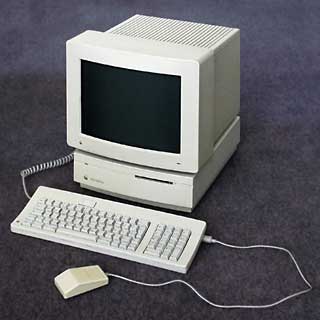
2001 – In 1991, I got my first Mac. It was a Mac IIsi with an 80 megabyte hard drive, which was considered a big drive then. Fast forward ten years, and we have 80 gigabyte drives that occupy the same niche in the storage environment. Compared to my first drive, a current 80 gig drive is 1000 times bigger, much faster, quieter, and even more energy-efficient.

 Nowadays an 80 MB hard drive has a negligible price. You can sometimes get them for free or less than $1.
There’s a saying that a cynic knows the price of everything but the value of nothing. Let’s not be cynical: A small hard drive can have a lot of value – even if it costs next to nothing.
How much space is 80 MB? Well, the answer depends on your perspective. If you were typing, it would take you about a month typing day and night at 60 words per minute to type an 80 MB document. Or 80 MB might be the size of an hour-long CD encoded as MP3s. Or it could be few seconds of uncompressed video. Capacity depends on what sort of data you are storing.
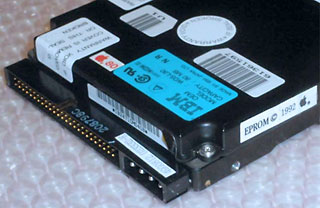 For many years, Macs shipped with 80 MB drives. Those drives seem small if we only consider their capacity, but storage-efficiency is more important. Storage efficiency is the term I use for the idea of “bang for your buck” or “thrust to weight ratio.” In reality, capacity is never really the issue. People care about what they can do with the space. If it were possible to compress 500 CDs of high quality music onto an 80 MB hard drive, people would love those hard drives. In fact, MP3s are popular because they increase the storage efficiency for music. MP3s let people fit 8 songs into the space that one uncompressed song might take.
Software varies in its storage efficiency. As hard drives have gotten bigger, developers have become less worried about storage efficiency. As a general rule, newer software takes up more space – even if it provides the same function. A minimal installation for starting up a Mac is less than a megabyte for System 6 – you can boot it from an 800 KB floppy. Mac OS 9 needs around 20 MB to make a startup disk – and the whole OS is ten times bigger than that. If you plan on using a smaller hard drive, you can increase your storage efficiency by using an older version of the Mac OS.
How much function can we fit into 80 MB? On my IIsi, it held everything: games, word processing, spreadsheeting, graphing, drawing, Internet software, and some space for documents – but I felt the space crunch. I would increase my storage efficiency by pruning. I could fit more programs if I got rid of all the tutorials, help files, and unnecessary documents.
My TRGpro (a Palm compatible) also has around 80 MB of capacity. The Palm OS is much more storage efficient than my IIsi. I have a fabulous relational database (similar to FileMaker 3.0) that takes 370 KB. All my programs only take up about 5 MB, even though they approximate the functions I had on my IIsi. Nearly all the Palm’s space is available for documents. I use that space for medical references like the Merck Manual or the 5 Minute Clinical Consult. In a year, I’ve only been able to fill half of the TRGpro. I don’t know that I can afford to buy enough software to fill up that huge amount of room.
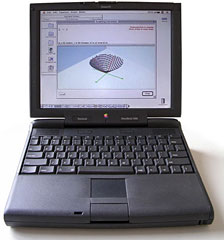 On my PowerBook 3400, 80 MB is a much tighter squeeze than on the IIsi. There’s no way to fit everything I want into 80 MB. Heck, Starcraft alone takes that much. But I am able to make a useful Internet appliance in 80 MB. I can run Mac OS 8.1 for a relatively modern Mac interface. I have a full functioning email program in Eudora. iCab works much better than Netscape 2.02, even though it takes less hard drive space. I use SoundApp for listening to music – it may not be the prettiest, but it is lighter on its feet than any other Mac player. With ClarisWorks added, I can have more functionality in this 80 MB than any Internet appliance that I have seen.
Why would I want to use 80 MB when I have a 1.3 GB hard drive? In a word, silence. Several older PowerBooks can boot off ATA flash cards. These cards are solid state memory that is silent and fast. By using solid state memory, my PowerBook can be 100% silent unless it is playing music. I don’t mean quiet like an iMac without a fan – I mean silent: You can’t tell whether the computer is on using only your sense of hearing. This helps the computer be unobtrusive.
What to do with an extra 80 MB hard drive? One of the downsides of playing with older Macs is that they are, ahem, old. Moving parts are the most fragile on a computer. You are more likely to have problems with a floppy drive or hard drive than you are with a video card or stick of RAM. An extra hard drive can be a lifesaver on an older Mac, since the hard drive is one of the most common causes of death in an older Mac.
Inside an external enclosure, 80 MB is also enough for a dedicated recovery hard drive. You can make a special startup hard drive with System 7.5.5 or Mac OS 8.1, depending on how old or new your Mac collection is. Load the hard drive with Disk First Aid, Disk Setup, and any other troubleshooting software that you own. If you run into problems you can plug it in and maybe save some data or get the computer working again.
Keywords: #smallharddrives
Short link: http://goo.gl/FKFkyZ
searchwords: 80mbdrives, smallharddrives
