
PowerBooks are wonderful but problematic. They can be too expensive, a poor desktop replacement, and not really that portable by the time they are packed up for traveling. Many people get caught up in the marketing around PowerBooks or iBooks when they would be better off with a different Mac.

With all these criticisms, you might conclude that I’m against laptops – or just jealous that I can’t afford a TiBook. Now I’d like to reframe these criticisms from my previous article.
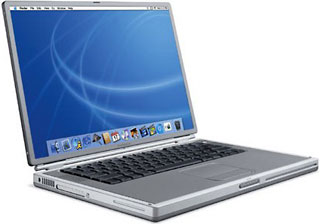 While many people overestimate portability, there are people who require it. For a salesperson who travels regularly, a PowerBook may be the only option. For many years the portability was hindered by one main problem – batteries would die. A classic PowerBook might only get an hour or two on battery power. Sure, there are extra batteries and plate batteries that add several hours, but they also add hassle and require you to worry about doing things like spinning down your hard drive or run off a RAM Disk.
Even if your batteries are strong, most people would still be connected to wires so that they could print, check their email, or sync their Palm. What’s the point of portability if the only place you can really get anything done is with a tangle of wires plugging into your PowerBook?
Improved Battery Life
Nowadays a new PowerBook or iBook have truly gotten around these issues. The batteries work longer than it is healthy for you to be working – and they work long even if you are pushing your computer by playing Myth II.
Wireless Networking

When the iBook introduced AirPort, it really unleashed the portability of Mac laptops. Sure, iMacs and Power Macs and the Cube can be outfitted with AirPort cards, but these do not really become any more portable because of it.
An iMac with a AirPort card can be moved more places in your house, but some limitations still weigh down the desktop computers. They all must be on a desk or table to be used comfortably. They have to be near a power outlet. The main use of having an AirPort card in one of these Macs is that they can act as a software AirPort Base Station so that you can save $200.
However, a PowerBook with AirPort can turn your recliner in the basement into a place to check the score of a football game that isn’t on TV. Or it can be set on the kitchen counter with the recipe for vegetarian chili that you downloaded from your favorite website. The combination of battery power and an Internet connection is amazing, and trends point toward public places offering wireless network connections with AirPort as the standard.
PowerBook Features That Have Come to Desktop Macs
Besides AirPort, there are many features that PowerBooks had for a long time before they migrated to the desktop. PowerBooks introduced software tidbits like Sleep and the control strip. PowerBooks had internal modems long before desktops. For as long as the PowerBook moniker has been around, the software and hardware has had useful little details that make the user’s life easier.
SCSI and FireWire Disk Mode
SCSI and FireWire Disk Mode are great examples. If you want to copy files between Macs, wouldn’t it be easier to just hook it up with a simple SCSI cable? Instead you have to set up networking, possibly assign passwords, or worse have to reboot because you didn’t have an extension enabled.
Instant Ethernet Networking
The new TiBook introduced a feature that allows it’s ethernet port to remap it’s wires so that you can hook up two Macs without an ethernet hub using a normal cable instead of a special crossover cable.
Persistent RAM Disks
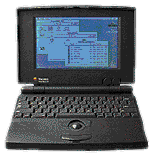 The PowerBook 100 introduced the value of a RAM Disk. The PowerBook 100 is unique among Macs in that it’s the only Mac that has hardware protection for the contents of the RAM. Even if you shut down the PowerBook 100, it maintains power to the RAM Disk for as long as the battery holds out. No error messages about needing to save the RAM Disk. No extra worries about accidentally losing the files on your RAM Disk.
PowerBook users were the first to really use a RAM Disk. Most users turned to a RAM Disk as a standard method for gaining battery time. With the System Folder and a few applications on a RAM Disk, the hard disk can be spun down to save a lot of power. A side-effect is that it is much faster than any hard drive. RAM has latency and bandwidth that’s a magnitude better than a mechanical hard drive.
RAM Disks fell out of favor as the Mac OS mushroomed in size – a minimal install of Mac OS 9 is bigger than the hard drive that came with my PowerBook 160, but I’ve been complaining about the bloating since System 7.1.
It All Adds Up
All of these little details add up. Having hardware supporting SCSI Disk Mode means that people who didn’t want to be bothered with networking could easily transfer files larger than a floppy. I don’t know if I could quickly explain to my Dad how to set up Mac networking, even though he’s an engineer. But he could surely connect two SCSI ports with a cable.
Having Sleep means that you can save energy and have quick access to your Mac. Sure it’s available on every Mac today, but PowerBook users have years under their belt, and they love their old ‘Books because they had the features before they were standard.
Smaller Size
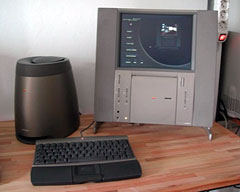 A final advantage that ‘Books have is their physical requirements. If you live in a small apartment, the decreased size of a PowerBook makes it much more convenient to store than most desktop Macs. The exception in my mind is the Twentieth Anniversary Mac, which shows how laptop parts could be used to build a slender desktop.
Reduced Power Consumption
The other physical requirement is energy. My PowerBook 3400 can encode an MP3 for much less than half the power necessary for a comparable desktop Mac, such as a SuperMac C500. If you leave your computer on for a long period of time, PowerBooks use even less energy and create less heat.
Quieter
On average, PowerBooks are also much quieter than desktops. Current Macs are unusual in that they don’t have fans, so they are much quieter than previous Macs. But among low-end Macs, PowerBooks are quieter.
Cost vs. Capabilities
I’m reminded of chemotherapy. Chemotherapy has the power to cure a fatal cancer, but at the same time it can be so toxic that it kills the person taking therapy. In a similar way, PowerBooks offer a wonderful Mac experience, but they can be terribly expensive and turn that experience sour.
In my next article I’ll discuss some reasonable approaches to buying a PowerBook or iBook. As always, your comments are welcome via email.
Keywords: #powerbooks
Short link: http://goo.gl/6wic7Y
searchword: rightwithpowerbooks
