
2001 – I’ve had the chance to own a lot of high-end PowerBooks. First it was the PowerBook 180 (instead of the top of the line 180c). Then the PowerBook 540. Lately I owned a Pismo PowerBook G3, and next week I’ll get my hands on a PowerBook 3400/180.

None of these PowerBooks were the top model available in their day, but each one was high-end because they had better screens and faster processors than other models.
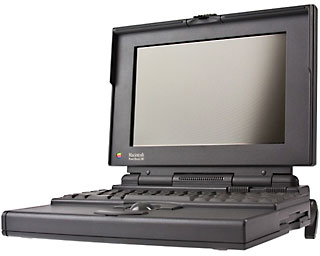 I’d like to compare the PowerBook 180 to the PowerBook G3. I’m in an unusual position to do this – last year I used both the PowerBook 180 and the PowerBook G3 as my main Macs. Last spring I had lightning damage the modem on my desktop PowerCenter Pro/G3, and the PowerBook 180 was my only computer with a modem. I used it for two months before I got a new modem. Near the end of the year, I got the PowerBook G3 (which is the only high-end PowerBook that I have owned during its reign at the high end).
PowerBook G3 Benefits
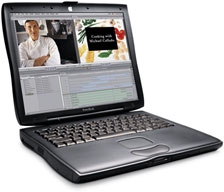 Which is a better PowerBook? Surely the PowerBook G3, you say. Of course the PowerBook G3 has a wonderful large color screen and is wicked fast compared to a PowerBook 180. The biggest difference in my mind is the AirPort card. AirPort means that I can surf anywhere there’s WiFi, and it also means that I unplugged the PowerBook more often. Although both PowerBooks are portable, AirPort let me use the portability within my house instead of just using it when I left the house.
Another advantage of the PowerBook G3 was that everything works “hot.” I can hot swap a USB mouse or a FireWire drive. I can remove the DVD drive with the computer on. Although putting the computer to sleep or shutting it down isn’t that much of a hassle, I felt safer, because I knew I couldn’t accidentally break something by changing it the wrong way. Besides, having automatic configuration of FireWire and USB is much simpler than figuring out SCSI ID numbers.
PowerBook 180 Benefits
In many ways, the PowerBook 180 has the same feature set as the PowerBook G3. It has a full range of ports that allow it to replace a desktop Mac. It has a wonderful active matrix screen. Indeed, since the screen is monochrome, it works well in bright sunlight. Instead of washing out like the color screens, the PowerBook 180 looks even better in sunlight.
The PowerBook 180 can also run two displays at the same time. As an aside, a PowerBook 180 can be a fabulous cooperative computer. One time I set it up with an external monitor with video mirroring, keyboard, and mouse. I opened up ClarisWorks so Jeff and I could work on a paper that we were writing together. When one got tired of typing, the other could start up. It was by far the best cooperative computing experience. It worked without fiddling. And the technology disappeared during our creation of the paper.
One advantage of the 180 (in my opinion) is that it has a trackball. I found that I am quicker with the PowerBook 1xx series trackballs than with the other pointing devices on PowerBooks. I could use one thumb to move the ball and the other to click the top button. I didn’t have to move my hand to start mousing. The Duo trackball was too small, and all the trackpads seem harder to manipulate the pointer as accurately.
With the older System software, I find the PowerBook 180 to be quite a bit easier to use. System 7.1 is snappy on the PowerBook 180, and it wakes from sleep quicker than my PowerBook G3. (However, the PowerBook G3 woke up nearly instantaneously when using Mac OS X Public Beta.)
The PowerBook 180 has fewer control panels and a much smaller System Folder. I’m not afraid to root around in the System or to remove extensions to make the System Folder smaller for a RAM Disk. Even as a power user, I’m shocked at the mess inside my Mac OS 9 folder. Where some of those extensions came from, I have no idea. Can I disable them? There are ways to find out, but it takes more time and makes fiddling less enjoyable.
Pick a High-end PowerBook
Overall, I think most of the almost-high-end PowerBooks are fabulous. If you are ever looking on eBay to buy a PowerBook, I would encourage you to stick with the high-end PowerBooks, since they are often a better deal than other PowerBooks of their day. For example, the $5-10 more that a PowerBook 180 costs over a PowerBook 160 is money well spent. Likewise a PowerBook 540 can cost practically the same as a PowerBook 520, yet it’s screen is better (and that allows you to play many more computer games!). Pismo PowerBooks, I expect, will be a better deal down the road than will the iBook, because of their larger screens.
Another advantage of used high-end PowerBooks is that they are more likely to have been upgraded. It is expensive to upgrade used Macs – I usually recommend trying to find a “tricked out” model, since that is invariably less money than upgrading the Mac yourself. A used 10 MB RAM card that maxes out a PowerBook 180 can cost as much as a whole PowerBook 180 14/80.
When you buy a used PowerBook, it is almost invariably to your advantage to get as much of a bundle as possible. Look for auctions that include carrying cases, docking stations and other extras since they are a better value if you are going to use the extras.
Keywords: #powerbooks #highendpowerbooks
Short link: http://goo.gl/OtsTa1
searchword: highendpowerbooks
