
2001 – One of the recurrent themes in computer advertising today is the “digital lifestyle.” Intel says that their Pentium 4 is the center of our digital world. Apple says that it wants to be our digital hub. People talk about going digital and wanting bits instead of atoms.

In this series of articles, I am writing about the state of the digital lifestyle. This article is about digital pictures.
As I stated in my article about text, I am taking a liberal definition of the word digital. Something is digital by my definition if it requires technology to use it. In my definition, the most purely analog form of a picture would be a drawing or painting. Without any technology, I could easily draw a map to my house by using my finger on my dirty car window.
For me, film cameras are a hybrid – there is a lot of technology involved in the manufacturing of the cameras, the film, and the film processing. But the final product, a printed picture, is analog, since it can be enjoyed without technology as a mediator.
A digital camera does not necessarily have prints as its final objective. Using a digital camera solely to make prints negates the advantages it has over a traditional film camera. Because digital cameras use binary data as an intermediate, they have some advantages over traditional film cameras – even if the end goal is simply printing the picture.
Advantages and Disadvantages
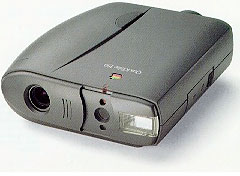 The competition between digital and film cameras is intense. More film cameras are sold every year (not including disposable cameras), but digital cameras are gaining ground quickly. Macintosh magazines have included digital photography for many years, ever since the first Apple QuickTake was released. Digital cameras and inkjet printers have improved to the point where the quality of final printouts is no longer in dispute.
Digital cameras have several advantages over film. If you plan on using the picture digitally, say posting it on the Web, a digital camera is more convenient because it captures the image digitally. This prevents the need for a conversion by scanning in a print. Picture manipulation is another point where digital cameras shine. Tasks like resizing and cropping a digital picture are much easier and less expensive than using film.
Like other digital files, pictures do not take up a certain amount of space – physical or data. A dozen rolls of film quickly turns into a large stack of pictures. The same pictures might only take up a portion of a hard drive. And the size of the picture’s data can be changed easily, too. A picture can be resized smaller or compressed with a codec like in the extremely popular JPEG file type. Although a JPEG is not an exact reproduction of a full color bitmap, it can approximate it very closely with 10% as much data. And pictures can be compressed even more than that.
Perhaps the most notable advantage of a digital camera is that most include an LCD screen. The screen means that people can have feedback about their pictures immediately. It is incomparably more convenient and enjoyable to look at a picture right after it has been taken than it is to take it to a one hour film lab.
The last major advantage of digital cameras is their capacity. With flash memory as inexpensive as it is now, it is possible to buy a memory card for the cost of a few rolls of film that will hold 100 pictures. Granted, a few rolls of film hold 100 pictures, too, but the flash memory is reusable.
Digital cameras also have disadvantages. In 2001, digital cameras are more expensive to buy than film cameras. A nice digital camera might cost $300 or $400, while a film camera with similar features may be under a $100. But price is a confusing issue. Digital cameras do not use film, so that can reduce their day-to-day cost. Fewer digital pictures make it to paper, so developing costs may also be lower with a digital camera. But digital cameras can use up batteries at a prodigious rate (use rechargeables!). The expense of a digital camera is difficult to estimate in a generic sense.
For a digital camera to become a fully digital device, it should be coupled with a digital picture frame. If all the pictures are printed, digital cameras offer minor advantages over film. With a picture frame, digital cameras allow pictures to become a part of the environment that is easily controlled. A few moments of scripting could make Christmas pictures show up around Christmas or automatically arrange all your child’s pictures in chronological order.
Current LCD technology makes digital frames an expensive proposition. Combining a digital camera and picture frame can add up to the equivalent of a whole year’s salary for a person working in a developing country.
The Mac as a Digital Hub
Macs have a long history of working with digital photography. For a Mac to be a good digital hub, it need to have the processing power to manipulate files, the space to store them, and the bandwidth to share them. People have been doing graphics on the Mac since the very beginning, but dealing with pictures takes a decent amount of hardware horsepower.
At a bare minimum, a color display capable of thousands of colors is necessary to display pictures – 256 color mode results in too much dithering and loss of quality. Enough RAM to deal with an uncompressed file is necessary for editing pictures. Hard drive capacity and CPU speed are also necessary to make file manipulation worthwhile. For simple resizing, cropping, viewing, a 68040-based Mac with 16 MB of RAM may be sufficient, but if complex layering is involved (with Photoshop), then a PowerPC 603e or better is a more appropriate choice. If files are compressed with JPEG, a 604e may be required to make the decompression transparent. Although a Quadra might display pictures perfectly, it can take 20 seconds for a screen-sized picture to decompress.
It’s also very helpful to have a CD burner so you can archive your digital images. This provides a backup in case your hard drive dies and also lets you go back to a fixed original if you’ve botched things in Photoshop.
On of the biggest advantages of the Mac as a digital hub is the software. Although Photoshop is a cross-platform application, it started out on the Mac and has provided a longer history of using digital pictures on computers. GraphicConverter is a comparatively inexpensive program that provides powerful tools for photo manipulation. Dealing with the transfer of pictures to a Mac can be convenient if the right type of adapter is used.
Problems with the Digital Lifestyle
Most people who have switched to digital photography are not going back to film any time soon. Pictures on a computer adds a whole new level of immediacy, enjoyment, and control. When compared to a film camera, I have only seen two problems that are bothersome. First, digital cameras go through batteries so quickly that sometimes the battery dies in the field. Without a battery a digital camera is useless, as are many film cameras. (But old mechanical cameras are still functional without batteries.)
The second problem is the expense of the cameras. Cameras are portable and can easily be dropped or broken. No one worries about dropping an $8 disposable camera, but a $400 digital camera is a different issue. Because digital cameras are based on hardware that is rapidly improving, this will go away over time. Already JamCam 3.0 offers 800 x 600 resolution for $40, which is better than a several hundred dollar QuickTake camera of a few years ago. Prices drop and resolution improves with time. There’s no reason we won’t have a 2 megapixel JamCam for $40 in a few years time.
Conclusion
Digital Photography is an obvious trend with nothing standing in its path. Film cameras will become niche products in the future. Although not as inexpensive as film cameras in terms of initial cost, digital photography will only get less expensive. Macs have been capable digital hubs for several years. But the real promise of digital photography will have to wait for flat screen technology to enable digital picture frames.
Keywords: #digitalphotography
Short link: http://goo.gl/7s9Nci
searchword: digitalpictures
