
2001 – One of the recurrent themes in computer advertising today is the “digital lifestyle.” Intel says that their Pentium 4 is the center of our digital world. Apple says wants the Mac to be our digital hub. People talk about going digital and wanting bits instead of atoms.

In this series of articles, I am writing about the state of the digital lifestyle. We begin with digital text.
Before talking about text, it is important to define what I mean by digital. A simple definition might say that being digital uses a binary system that involves ones and zeroes. Digital video, for example, has the images written to a binary-based file. In older analog video, there are not discreet values but are gradients of light and dark and color. That’s a technologist’s definition of digital.
For my purposes, I’d like a broader definition. Data is digital when it requires technology for us to use it. A book is analog, since I can pick it up and start reading it. Microfilm would be considered digital by my definition, since I have to have a microfilm reader to be able to understand it. Technically, however, a microfilm is considered an analog medium because the writing on it is not really encoded, it is just photographically miniaturized. I consider text to be analog only if it is human-readable.
Advantages and Disadvantages
What does digital text mean? Everyone who reads Low End Mac deals with digital text all the time. This Web page is encoded is ones and zeroes; it requires a computer of some sort to decode the bits into characters that show up on a screen. Or perhaps the bits are decoded into Braille for a blind person to read or even converted into speech by a text-to-speech program. We are so familiar with digital text today that we overlook it’s advantages and disadvantages.
Some of the advantages are obvious. A text file doesn’t occupy any volume. My copy of Fellowship of the Ring is roughly the size of a hard drive, but if the text of the book were digital, it could be put on the hard drive, along with all the writings of J.R.R. Tolkien. Heck, with the density of current hard drives, all his writings could also be translated into several major languages and all the academic articles about him could also put on that same disk, which would be the same size as one book.
As data density improves, we can fit more text into the same volume. My current hard drive has roughly 1,000 times the capacity of the one I had ten years ago. There’s no way to make a human-readable book 1,000 times more dense and keep it readable without relying on technology.
Another advantage of digital text is that is can be easily converted and copied. If you want to put it on a Palm, you can take text and make a doc format file that uses about half the number of bits of ASCII formatted text. Alternatively, you could take the same text and put it into an HTML file and enrich the data with links to related information on the Internet.
If I don’t like the size of print in a book, I can not easily change the font size or formatting. Indeed, this was one of the revolutionary aspects of the first Macintosh – the Macintosh brought font terminology into the general lexicon. Twenty years ago few people would have understood what was meant by 18 point Helvetica bold.
Digital Drawbacks
But digital text has disadvantages, too. Digital text requires specific hardware. What if you had an important file on a floppy disk and you have an iMac? The data is useless to you unless you get a USB floppy drive or stick the file on a CD or network.
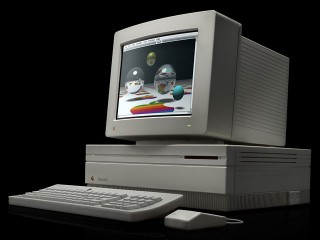
In the early 1990s, you had to be careful in choosing between double density 800K floppies that would work with a Mac SE and high density 1.4M floppies that would work with a Mac IIfx. If you stuck a high density floppy into an old SE, you might damage the disk.
Digital hardware is always changing. Although it is easy to convert text, you must frequently do so, otherwise you may lose access to it. A current Mac shares no hardware in common with a Mac Classic. Floppies, SCSI hard drives, LocalTalk networking, serial ports, and ADB are all gone. They can be still used with certain adapters, but that involves more money.
Another disadvantage of digital text is that the formats of files change. I used Word 5.0 for most of college, and reading the text today means that I have to use a conversion program. In the process, I may lose formatting or some of my writing. If I used specific Word features, I may not get a clean conversion. For the most part, my Word files are still easily readable, since Word was widely used and is still being sold.
But WriteNow, the word processor that replaced Word on my hard drive in 1994, was not so fortunate. I can get the data on a Macintosh, but I’d have a hard time to get a clean conversion of a WriteNow file on another computer, be it Windows, Linux, Palm, or cell phone.
Update: LibreOffice can import WriteNow files – as well as old versions of Microsoft Word, Microsoft Works, ClarisWorks and AppleWorks, and many other word processing formats – not to mention spreadsheets and other document types. It was not available when this article was written in 2001.
One final disadvantage of digital text is that it requires a device to be created. We usually forget about keyboards as digital devices. Typing on a computer keyboard converts our finger motions into bits of text. But what if you have text that is already analog? It may be relatively easy to convert a typewritten letter to digital text, but it would be next to impossible to convert a handwritten love letter to digital text without manually retyping it. A Palm organizer is not nearly as convenient for jotting down a phone number as a Post-It® pad.
The Mac as a Digital Hub
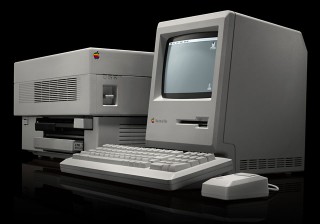
Mac Plus with LaserWriter
I feel silly asking if a Mac can handle digital text. Digital text was the Mac’s killer app! Back in the 1980s, all that personal computers could deal with was text. But the Mac was exceptionally adept at converting digital text back into analog. Macs mainstreamed technologies like fonts, laser printers, and desktop publishing. With a Mac and the right software, digital text could be rendered in the highest quality of analog form – a professional book or fancy office newsletter.
Being able to deal with a type of data, say text or video, is a combination of three different components. First, is the computer fast enough to manipulate the data in real time? Second, is there enough space to hold all the data? And finally, is there enough bandwidth to share the data easily?
Dealing with digital text is easier than ever. Every Mac ever made has enough speed to handle text in real time. It’s a frequent refrain on Low End Mac – this Mac is more than you need for basic tasks like word processing or email. Hard drives today make worrying about space for text files a thing of the past. It is possible to store everything you would write in your whole lifetime on a hard drive that costs $100. The text of an average person’s library would easily fit on a CD. And since text files are small, individual files can be shared easily with a 2400 baud modem or a 3.5″ floppy.
Problems with the Digital Lifestyle
To exploit a Mac as a digital hub for text, you need to use the right software. There are many applications that deal with text, but it is important to pick one that can both import and export plain text. Plain text (also known as ASCII) is the lowest common denominator that allows for the easiest interchange between different computers and applications. If you have an ASCII file, you can probably make it work on any computing platform for the near future.
One common mistake is choosing a program like Microsoft Word. Sure, Word is a powerful application, but its main purpose is word processing. It is designed to make beautiful printouts. A printout, remember, is analog. Although Word can export and import plain text, it is an extra step. The best programs deal natively with text – their file format is text. With Word, future compatibility means doing document conversion.
Nisus Writer 4.1.6 is a much better choice. Although Nisus is designed to make good printouts as well, it has a heritage as a text editor. It stores its files as a text file with the formatting in the resource fork. This means that any text editing program on the Mac can open the file and see the text. You can download version 4.16 for free from www.nisus.com. This is a powerful program that fits well into a digital lifestyle, even if it is from 1995.
Another common problem is not saving text. I still encounter people who delete old email to save space on their computer. This is ridiculous. It may make sense to archive for simplicity, but text shouldn’t be deleted – hard drive space is practically free when it comes to text files. A CD-R will probably suffice for all the email text I will accumulate in my lifetime and costs $0.25. If you are living the digital lifestyle, you should save all your text because it provides you information you may later want.
Conclusion
All right, text is a no-brainer. I suspect that everyone who reads Low End Mac has already made the switch to digital text. You don’t print out emails to read them. Much of your writing never sees a printer or page. Furthermore, text is not an expensive lifestyle – there are many Macs selling for under $10 that are brilliant text processors.
If your Mac can connect with your other devices, such as a Palm, then it can easily function as a digital hub.
Keywords: #digitallifestyle
Short link: http://goo.gl/lu35D9
searchword: digitaltext
