
Last week I wrote about revolutions and participation. Revolutions in technology are rarely what we think they are. When something is termed revolutionary, it is usually a marketing ploy. For something to truly be revolutionary, I think that it requires participation from the users. Revolutions can’t be done for you by someone else.

Last week, I looked at some supposed revolutions and why they turned out to be duds. Now I want to look at a boring everyday program that can change your life for the better. (Sounds like advertising, huh?)
Consider a database. There are more database programs than I can think of. dBase may have been a huge product a decade ago, but nowadays databases are nothing special. If you want a mix of power and simplicity, FileMaker is a popular choice. You can use Microsoft Excel as a database as well as a spreadsheet. Many Mac users have ClarisWorks or AppleWorks, which has a database module.
There are probably some freeware databases for the Mac, but none spring to mind right now. For the cutting edge, Mac OS X will open up a world of database programs that will use its BSD core. But databases are old news.
It would be hard to get home users excited about a database. “Look, you can find a record that you typed in before!” That doesn’t wow people anymore. And many users have tried databases only to find that the time used to build it is more than the time they save. Or rather, hypothetically save.
But databases can be truly revolutionary. I believe that a good database is necessary for happiness. Seriously. If we go back 2.5 kiloyears (which is either a millennium or 1024 years, depending on interpretation) to ancient Greece, we get this maxim: Know Thyself. Philosophers argued that in order to live The Good Live (Eudymonia), you needed to know about yourself.
The idea also makes sense in the converse. How could you be happy if you didn’t know yourself? How could you engage in worthwhile relationships if you don’t know what you want?
Using a database can be a tool to know yourself. The database does not need to be on a computer – most things done on the computer could be done well on paper as well. Computers help by making analysis of the database easier.
Let me give an example using a Mac and a database was revolutionary for me.
In the early 1990s, I was a college student at Stanford. I had limited finances, which included a job working for the School of Engineering’s computer cluster. I had 30 Macs and 6 Unix workstations to manage – a great job, because I had a subscription to MacWeek.
My personal finance skills were limited. I used a “100 system.” I would mentally keep a rough estimate of how much money I had in $100 increments. When my mental balance reached $100, I stopped all spending until I got a paycheck. I never bounced a check, but the method was pretty crude.
I was lucky that I was in college: I already had food and housing covered. If I had been using that system in the real world, I undoubtedly would have made a mistake and not been able to pay rent or eat. Or I would have gone into debt.
I suspect that credit companies count on those mistakes. Looking at the way they send free cards to college students, I am glad that I did not accumulate debt like some of my friends. I had one friend who had $2,000 on his card. Considering my income in college, I don’t know if I could pay that off in a year even if I tried.
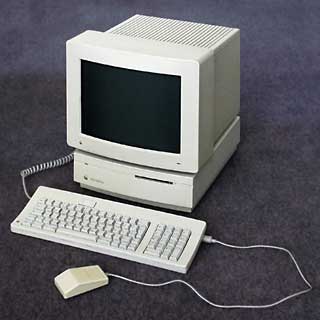
 Enter the database and my Mac IIsi. In 1994, I got Quicken 4 for $45. I think it’s probably the best $45 that I have ever spent on software. With Quicken, I started to track my spending. I kept my different accounts organized. I kept track of where all those $20 bills went that I got from the ATM. Quicken is a database that is organized to do a specific task (manage money) rather than do general database work.
Armed with knowledge of exactly how I spent money, I could easily see where I was getting my money’s worth. I felt like I had more money, because I got more enjoyment from what I spent. Quicken got me interested in personal finance and frugality. It wasn’t that it forced me to stop spending, but Quicken offered me enough knowledge about myself so I could make better choices given my tradeoffs.
It gave me the information I needed to be able to decide that a particular purchase was a bad idea. A major benefit was that I could clearly appreciate how debt was costing me money. If I paid my loans faster, I would have more money. If I paid the loans at the regular rate, I would spend thousands more in interest than if I accelerated the payback. I just don’t get very much pleasure out of paying banks. And $1,000 would buy a lot of those burritos that I do enjoy.
Quicken is a revolution that cannot be watched from the outside. Sometimes it even sounds silly to me that I’m praising a simple database. But to get the breakthroughs, I had to spend 15 minutes every week (5 minutes every other day) entering data about my spending. For a while I kept track of the pennies, but later I decided to simplify to consider only full dollars. After I made that switch, I could buy gum for “free” and not have to enter tiny transactions into Quicken. But that time invested “Knowing Myself” and my spending patterns had huge dividends. The simple act of remembering where I spent my money changed my relationship with money.
Using Quicken is a lifestyle. It describes a pattern of living that involves regular time taken spent in reflection. From a reflective pose, it is easier to discern value than from the impulsive pose that advertisements encourage. Quicken lowers the barrier to entry – it makes it easier to understand spending without the effort of mathematics.
My participation really is the key. There is no way that Apple or Intuit or any other company could give me the same insight as using Quicken on a regular basis. The technology definitely enabled me, but only because I took the right product and applied it to my life. It just wasn’t more megahertz or version 2001 that mattered.
Next week I’ll write about using a mobile database in the form of a Palm.
Publisher’s note: Quicken was developed initially for the Apple II and IBM PC in 1983.
Keywords: #quicken
Short link: http://goo.gl/NYo3Yy
searchword: revolutionarydatabase
