
I detest the background noise of computers; I’m not alone. On several other websites (especially Slashdot), the topic of quiet computers comes up on a regular basis.

In the discussions I’ve read, lots of ideas get bandied about. Most users start by finding a high quality power supply with quiet fans or undervolting their fan. Fan noise is not linear with fan speed, so a small decrease in speed (with a decrease in airflow) can make a big difference in the noise of the fan. Of course there is a fine line here, since overheated computers can crash or wear out more quickly.
Another goal is to lower the noise of the hard drive. There are kits that surround a hard drive with sound insulation to help reduce the whine that is so familiar to computer users. The kits I’ve looked at have aluminum plating that helps eliminate the heat that would otherwise build up. This won’t work with the high-performance drives that spin quickly, but it works for low-end models that run 5400 rpm or less.
Some people make their computers quieter by using distance. Sound energy spreads out in three dimensions and rapidly dissipates over distance. Something closer to your ears, say headphones, will sound much louder than when it is farther away. So some people move their computers into a closet and then get really long monitor and keyboard cables. It’s inconvenient when they need to put in a CD, but otherwise it works pretty well.
A Mac Advantage
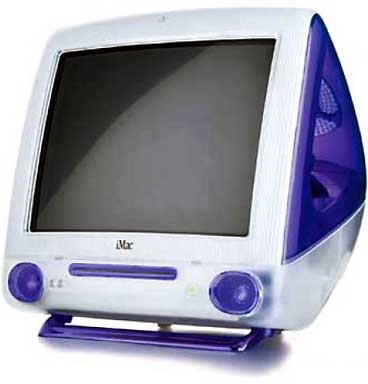 Since the last major revision of the iMac, Mac users have had bragging-rights for noise. Instead of finding a quieter fan, Apple redesigned the iMac to be cooled by airflow so it didn’t require a fan.
This hasn’t been copied by PC makers, because they face a much larger engineering hurdle than Apple did. One of the main physical differences between x86 processors and PowerPC processors is how many watts they use. A G3 processor produces much less heat than any desktop Intel or AMD chip. Since Apple’s computers generate less heat, they can get away with less cooling.
That’s design done right.
I want a silent computer, because there are places that I could use a computer but where the sound is unacceptable. For example, I’ve written before about my digital picture frame/stereo idea. (See Mac Network Appliance: Sound and Pictures. More on that later.) It would be great to have a stereo in my bedroom that would double as a picture frame. That way my night stand could show me my beautiful fiancé or play some music in the morning.
Silent, Not Just Quiet
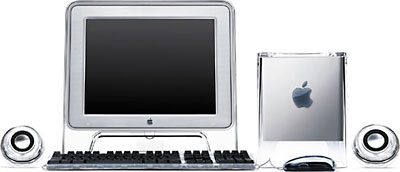 But I do not want a quiet computer, such as an iMac or a Cube. I want a silent computer. No extra background noise is acceptable to me.
For a perfectly silent computer, the best option is an older PowerBook. In particular, the 5300, 1400, 3400, and 2400 are the best models. The feature that all these models share (but that is missing from later PowerBooks) is the ability to boot from a PCMCIA card (a.k.a. PC Card).
CompactFlash Pros and Cons
Nowadays a 64 MB CompactFlash card goes for under $40, and the PCMCIA adapter sells for under $10. That 64 MB is more than enough to make a boot volume of Mac OS 8.1 that holds a handful of key programs. When I network my PowerBook 3400 with an inexpensive server, like my Quadra 630 with a 60 GB hard drive (see Mac Network Appliance: Making Your Own MP3 Server), and I have a a completely silent computer.
One thing that surprised me about CompactFlash (CF) is the speed – or rather the lack of speed. When I benchmarked the CF disk, I got reads and writes in the 600 KB/sec range. (For more on CF speed, see Memory Speed Matters.) The hard drive on the laptop is five times faster.
Another concern with flash memory is that it has a limited number of read/write cycles. But my 3400 isn’t being used for work, so I’m not worried that I’ll wear out the card. When the card does fail, it fails like a floppy – a specific block stops working. If I reformat the card, I can get the rest of the card working. This should be reasonable reliable and inexpensive.
The RAM Disk Option
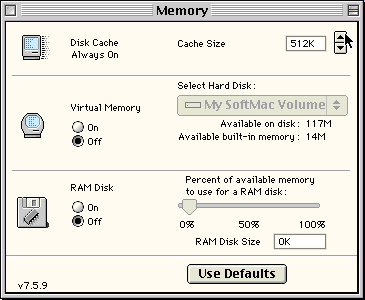 The other option for a silent PowerBook is to use a RAM Disk. When you create a RAM Disk in your memory control panel, it sets aside some of your RAM as a disk. That memory is not available for your System or for applications, and that memory gets taken out before Virtual Memory or RAM Doubler gets a chance to work. If you go that route, you might want to revert to Mac OS 7.6.1, since it is smaller than 8.1.
A RAM Disk turbocharges performance. My RAM Disk runs about ten times faster than the hard drive. (That’s 50 times faster than the CF card!) But RAM on a PowerBook is much more expensive, and it is specific to the model. CompactFlash is a standard, which means you can use it for other things (like on my Palm-compatible TRGpro or my Digital Elph.)
As they say, silence is golden.
Keywords: #silentcomputing
Short link: http://goo.gl/xCQ60T
searchword: silentcomputing
