
Apple Archive
Looking at the iMac
- Nov. 24, 2000
When the first IBM Personal Computer (model 5150) came out in late 1981, it was beige and black. Nothing special, but it looked incredibly impressive with it's long case, green and black monitor, and dual 5.25" floppy drives - or possibly even a 5.25" floppy drive and 10 MB hard drive!
When the Macintosh came out in
1984, it was no wonder people thought of it as a toy. It was small,
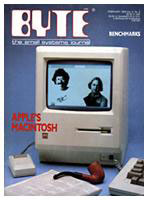 tan coloured, had a tiny b&w
screen, one 400K floppy drive (which could hold more than the IBM
PC's drive), and a carrying handle!
tan coloured, had a tiny b&w
screen, one 400K floppy drive (which could hold more than the IBM
PC's drive), and a carrying handle!
A portable computer that could do more than a standard desktop model? It seemed as if people thought bigger was better, and they continued to buy Apple IIs and IBM PCs and compatibles.
Only when PageMaker, the LaserWriter, and programs like Excel (from Microsoft who just happened to make MS DOS, the operating system for the IBM PC) came out, the Mac became a success. People started recognizing its capabilities.
The iMac
Today, a bland beige or tan box is not what you think of when
you think of an Apple computer. You might 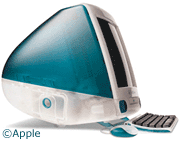 think of the original
iMac, the blue-green (Apple calls it "bondi blue") odd shaped
computer that looks like a combination of a spaceship and an egg.
In the past year, the iMac has gotten even more stylish. The new
iMacs are amazing - among the best designed computers out there
today, if not the best. The shiny deep coloured plastic
draws you to it - the Apple Pro keyboard and Pro Mouse are ready
for your hands.
think of the original
iMac, the blue-green (Apple calls it "bondi blue") odd shaped
computer that looks like a combination of a spaceship and an egg.
In the past year, the iMac has gotten even more stylish. The new
iMacs are amazing - among the best designed computers out there
today, if not the best. The shiny deep coloured plastic
draws you to it - the Apple Pro keyboard and Pro Mouse are ready
for your hands.
The mouse can be summed up in one word: cool. It is cool because of its little red laser (that alone makes me want one). It's see-through sparkling silver top makes you want to try it. And that's just what you will have to do to feel how smooth and precise it is.
The keyboard is a scaled-up version of the iMac keyboard. The Pro keyboard adds volume controls that may remind you of the front mounted volume controls on the 5X00 series Performas. It also adds full-size function keys and a CD eject/power (the power function doesn't work on iMacs) button, while keeping a compact size and acting as a two port hub. It is decent, but not as good as the original Apple Extended Keyboard that came out in 1987.
Now we come to the iMac itself. The first thing you notice,
before you even turn it on, is that the 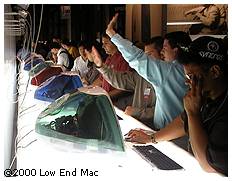 case is shinier, more transparent, and
in a different (darker) colour than earlier iMacs. The minute you
turn it on, you may experience slightly better sound quality from
the little speakers in the front. One thing that hasn't changed is
the screen. The screen is still 15" and can't support more than
1024 x 768; I think it's about time for 17".
case is shinier, more transparent, and
in a different (darker) colour than earlier iMacs. The minute you
turn it on, you may experience slightly better sound quality from
the little speakers in the front. One thing that hasn't changed is
the screen. The screen is still 15" and can't support more than
1024 x 768; I think it's about time for 17".
The new iMacs run Mac OS 9, which is a bit slower than 8.6 (if you are used to that), even on a fast machine. They also ship with their own desktop pictures that match the colour of the computer, just like the fruit flavoured ones shipped with their own colour desktop patterns.
The iMacs can also be an incredible value, but it can also be an incredible waste of money. It's just $799 for something that, if you think about it, can do many things that we would never be able to do without a computer. Of course if you think of it as a toy, not a real computer, $799 is an incredibly high price to pay for something to "play with." (That's what $5 Mac LC's are for!)
My recommendation? If you need a compact machine for fast Internet browsing, email, desktop publishing, making home movies, editing photos, or even playing the latest games (many games require a G3 these days, and some won't run on my original beige G3), the iMac may just be the machine you need. Stop by a local computer store and try it out for yourself. I am sure you will agree with me that it is simply amazing - most certainly not just a toy.
About LEM Support Usage Privacy Contact
Follow Low End Mac on Twitter
Join Low End Mac on Facebook
Favorite Sites
MacSurfer
Cult of Mac
Shrine of Apple
MacInTouch
MyAppleMenu
InfoMac
The Mac Observer
Accelerate Your Mac
RetroMacCast
The Vintage Mac Museum
Deal Brothers
DealMac
Mac2Sell
Mac Driver Museum
JAG's House
System 6 Heaven
System 7 Today
the pickle's Low-End Mac FAQ
Affiliates
Amazon.com
The iTunes Store
PC Connection Express
Macgo Blu-ray Player
Parallels Desktop for Mac
eBay

