Low End Mac
Search LEM 
Donate · Amazon.com · MacResQ · Advertise
Other Cobweb sites: Low End Living · Reformed.net
Quicklinks: · Power Macs · 'Books · Early Macs · Week's Best Deals · Best Buys · OS Downloads
Apple Archive

Is It Worth Putting a G3 in an Older Mac?

A 'Best of Apple Archive' Article

Low End Mac Reader Specials

Memory To Go Special: MacPro 8 Core Memory 4GB kit $192 / 2GB kit $109. MacBook Pro / MacMini / iMac Intel Core2 DUO 2GB $44 1GB $23--Free shipping available.

Download Typestyler, still the Ultimate Styling Tool for Internet, Print and Video Graphics. Works great in Classic with a Native OS X Version on the way. Free Tryout: www.typestyler.com

LA Computer Company: LA Computer Company: Specials on AppleCare, Apple Displays, MacBooks, iMac's, MacBook Pros, Laptop and iPod accessories and more. Apple A/C Adapters for laptops starting at $25.00 Call 1-800-941-7654 or Click Here.

Other World Computing: OWC Mercury Elite FW800/FW400/USB2/eSATA TOP-RATED Solutions offer High Performance, Reliable storage for all your data storage needs. Industry leading 2yr limited + up to 5yr HD Mechanism Warranty too! Up to 2.0TB(2000GB), 500GB specials from $199.99

Mac users can finally play Party Poker for Mac. Not only that, they can also learn how to play PokerStars for Mac.

Laptop Hardware Provided by TechRestore - Overnight Mac & iPod Repairs.

Compare products like desktop computers, laptops, and LCD TVs side by side! All the information and reviews to make the best purchasing decision for a new cell phone GPS products or MP3 players. The Ciao network makes searching products easy for you.

Memory For New Intel Core2 DUO MacBooks, MacBook Pro, MacMini & iMacs" 4GB Kit $80, 3GB Kit $60, 2GB Kit $40, 1GB $20. Click to Maximize your Macs...

- 2000.11.03

So you want a G3. You may have noticed that there are a number of G3 upgrades on the market. You may have also noticed that the prices on the real G3 computers are falling fast.

If you are like most people, you want the most computer for the lowest price, and I am here to tell you not to buy a pre-G3 for upgrade. Yes, that's right. Except for a few special cases, spending money upgrading to G3 from a pre-G3 Power Mac is like throwing an extra $100 down the sink.

It's not worth upgrading the NuBus Power Macs to G3 unless you have spent a fair amount of money on your machine in the past (see Guide to G3 Upgrades for NuBus Power Macs). I tried out a 250 MHz G3 upgrade from Newer Tech, and that 250 MHz card gave less performance than my beige G3/233. You can buy a Power Mac G3/233 for $450-550, and that's with a PCI bus, faster CD-ROM, better video card, etc. Don't get me wrong, the performance with the upgrade is pretty good considering the machine itself is six years old, but it isn't as good as the performance of a computer designed around a G3.

If you are looking for an inexpensive G3 machine, an 8100/80 with enough RAM and hard drive space would cost you $200. Adding the cost of the least expensive G3 card brings it to about $400 total. Also, some upgrade cards won't work without their extension installed, like the Newer Tech card I used. Want to install OS 9 from the OS 9 CD? Be prepared to put the brakes on that G3 speed! Paying $400 for a "half a Power Mac G3" is not worth it - $100 more will get you a true Power Mac G3 which can run OS X, uses cheaper IDE hard disks, and accepts PCI cards.

Now some upgrades are worthwhile, such as the 6400/6500/5400/5500 upgrades (see Guide to G3 Upgrades for Level 2 Cache Slot). These Macs offered some options not available in other models, such as a TV tuner card, A/V capture, and a built in subwoofer. The 5400 and 5500 come in an all-in-one desktop case, so they are especially nice to have around. Best of all, a 300 MHz Sonnet upgrade costs about $200, which is a good deal if you already own one of these Macs and want to get a good speed boost.Twentieth Anniverary Mac

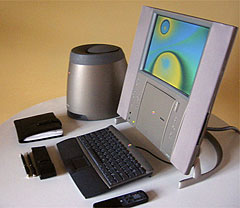
Of course if you have a Twentieth Anniversary Macintosh, you may want to buy the G3 card just so you can keep the extremely cool looking design but have G3 performance.

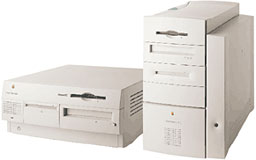
Upgrading the 7500-9600 can be cost effective if your machine is in good condition and you've spent a lot of money on RAM or other upgrades. If you want to buy a 9600 to upgrade, be prepared to spend about $1000. That's about $500 more than it would cost you to buy a real G3!

With the falling prices for used Power Macintosh G3s, G3 upgrade cards are becoming more of a "why bother?" The G3/233 can be had for around $500 today, and a 7500 today is worth around $300 with a decent amount of RAM and a good sized hard disk. A G3 upgrade for the 7500 costs about $200.

Add it up, and the G3 desktop, with it's 24X CD-ROM drive, 4 GB hard disk, and OS X compatibility looks like the winner. For me, the decision is a no-brainer.  LEM

Recent Apple Archive articles

Recent Content on Low End Mac

  • Mac of the Day: Macintosh LC, Oct. 1990 - only 3" tall, the LC was the least expensive color Mac in 1990.
  • List of the Day: Jaguar List is for anyone using Mac OS X 10.2.x.
  • Channels
     Power Macs
     iMac Channel
     iBook/PowerBook
     MacInSchool
    Computer Profiles
     iMac
     Power Mac
     PowerBook/iBook
     Performas
     Mac Clones
     Older Macs
     LisaNeXT
    Editorial Archive
    Mac Daniel's Advice
    Email Lists
    LEMchat (uses AIM)
    Online Tech Journal
    Consumer
     advice, reviews
     guides, deals
    Software
    Apple History
    Best of the Web
     Best of the Mac Web surveys
    Miscellaneous Links
     Best Used Mac Buys
     Used Mac Dealers
     Video Cards
     Mac OS X
     Mac Linux
     Macspeak
     RAM Upgrades
    About Low End Mac
    Site Contacts

    Open Link

    Support LEM

    Affiliates

    The Apple Store
    .mac
    iTunes Store
    Club Mac
    MacMall
    MacResQ
    ExperCom
    eBay
    Amazon.com
    PayPal
    PCMall
    PC Zone
    Crucial Memory

    Our advertising is handled by BackBeat Media. For detailed price quotes and advertising information, please contactat BackBeat Media (646-546-5194). This number is for advertising only. Apple Archive articles copyright ©2000-07 by Adam Robert Guha. Entire Low End Mac website copyright ©1997-2008 by Cobweb Publishing, Inc., unless otherwise noted. All rights reserved. Advice presented in good faith, but what works for one may not work for all. Please report errors to .
      LINKS: We allow and encourage links to any public page as long as the linked page does not appear within a frame that prevents bookmarking it.
      Access our RSS news feed at http://lowendmac.com/feed.xml.
      Email may be published at our discretion; email addresses will not be published without permission, and we will encrypt them in hopes of avoiding spammers. If you prefer your message not be published, mark it "not for publication." Letters may be edited for length, context, and to match house style.
      PRIVACY: We don't collect personal information unless you explicitly provide it. For more details, see our Terms of Use.
      Low End Mac is an independent publication and has not been authorized, sponsored, or otherwise approved by Apple Inc. Apple, the Apple logo, Macintosh, iBook, iMac, eMac, iPod, PowerBook, MacBook, Mac Pro, Apple TV, and AirPort are registered trademarks of Apple Inc. Additional company and product names may be trademarks or registered trademarks and are hereby acknowledged.