
Your friend told you of a great deal on a 17″ monitor in the local computer centre. Naturally it is a PC monitor, not compatible with your Macintosh – or is it?
Almost every Macintosh model can support a PC monitor (VGA), and there is almost always a way to add support even to those without built-in video.
The exceptions are the original Macintosh, Mac 512K, and 512Ke. There is no expansion slot, SCSI port, or monitor cable on these.
SCSI Adapters
 For the Macintosh Plus, Classic, and Classic II, some companies made video adapters that plugged into the SCSI port, such as ScuzzyGraph. These would let you display an image on a Mac compatible monitor, usually an Apple 640 x 480 monitor or a portrait monitor.
These were slow, but they worked. They only supported 8 colors (not 8-bit color) on the Plus, SE, and Classic, since none of these machines support 32-bit QuickDraw. These are so old, they almost definitely have no support for VGA monitors. I do not know if the Griffin adapter will work with them or not, so I will say that these are not VGA compatible models.
Video Cards
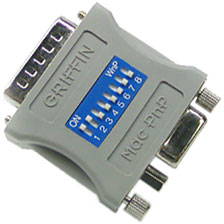 On the SE and SE/30, you could install a video card that would let you use many different monitors. I know of none that are VGA compatible, in which case you will need a special type of adapter that lets you use a VGA monitor with a non-VGA compatible video card. It is called the Griffin II series video adapter. It is made by Griffin Technologies and costs $28 plus shipping. It is the only way to use a multiscan monitor on a pre-LC Macintosh. (I do not know for sure what video cards it is and is not compatible with. You can contact Griffin for more information.)
You need to use the Griffin adapter on all of the Mac II series as well.
Mac with Some Built-in VGA Support
Prior to 1999, Macs used their own 15-pin video port. Even on models that support VGA, you will need an adapter to connect the display. Starting with the Blue and White Power Mac G3 in early 1999, Macs started to include VGA ports.
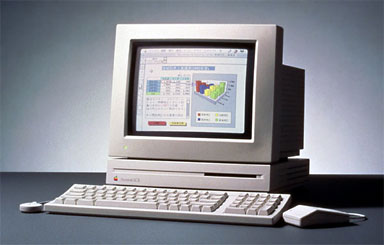 The LC series introduced VGA monitor compatibility. The first model to have this was the Mac LC, which supports a VGA monitor at 640 x 480 with 16 or 256 colours (256 only if you have 512 KB VRAM installed). The LC II shares the same video.
The LC III, LC III+, LC 475, and Performa 450-478 featured newer video that could have up to 1 MB of VRAM. This supports a VGA or Mac monitor at 640 x 480 or 832 x 624 (832 x 624 with the Apple display software). The LC/Performa 500 series have a built in 640 x 480 monitor: Trinitron on the LC/Performa 520-578, and shadow mask on the 580. These can use external monitors with a video card. VGA monitor support requires a card.
Somewhere around that time, Apple introduced a VGA compatible monitor, the Apple Basic Colour monitor. This monitor was compatible with PCs, or you could use it on a Macintosh with the right cable. This monitor was a popular model to go with the LC III’s replacement, the LC 475.
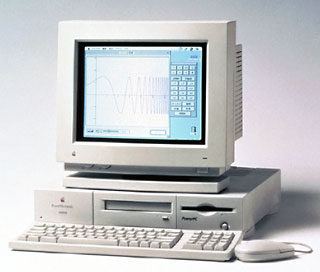 With the Power Macintosh 6100, 7100, and 8100, you can either a Mac or PC monitor on the internal video at up to 832 x 624, although using anything but the Apple AudioVision 14 requires an HDI-45 video adapter, which seems to go for a pretty penny on eBay right now.
However, with the 6100/60AV and 6100/66AV, you have a separate video (AV) card with 2 MB of VRAM that lets you use almost any type of Mac or PC monitor at resolutions up to 1152 x 870. The same goes with the 7100 and 8100 series, although there was also an optional High Performance Video (HPV) card that you could buy for them. The HPV card can accept up to 4 MB of VRAM and show millions of colours. This card will drive almost any Mac or PC monitor made. You cannot, however, use it with a new Studio Display (or flat panel) Apple monitor. They only work with a Power Mac G4 or Cube.
The 6200, 6300, 6320, 6360, and 6400 Performas and Power Macs all use similar video cards and can drive a Mac or PC monitor at up to 832 x 624. Almost any Mac since then can use almost any Mac or PC monitor. Some exceptions are the new Apple displays and the Apple flat panel displays. They require a G4 or Cube, so if you don’t have one of those, don’t bother buying a new Apple monitor.
If you already hooked up your Mac monitor and are getting only 640 x 480 when your Mac system can easily do 800 x 600, your PC monitor may not be multiscan. That means it is a fixed resolution screen not capable of changing to any other resolution than the one that it is set for, which is usually 640 x 480. Most older (pre-1994) IBM PS/2, Apple, and Sony Trinitron monitors are fixed resolution.
If you need to find a VGA adapter, I highly recommend the little one with no switches available from CompUSA or any other computer shop for several dollars (or they may just give one to you, if you ask – since they come for free in many monitor boxes, the store can’t resell them).
You could buy an adapter with switches (to set the resolution), but I have never found that necessary. Try the “switchless” model first, and if it doesn’t work (it almost always does), then go out and buy the one with switches. Also remember that certain Macs, the compact Macs and the II series, for example, don’t support VGA monitorsand for them the special adapter from Griffin Technologies is needed.
Being able to use a PC monitor on your Mac opens up a whole world of great monitors to choose from. There are lots out there. Some names you may have heard of are Sony, CTX (I highly recommend CTX monitors – I am using one now and have found it to be of very good quality), Relisys, NEC, and ViewSonic.
When shopping for a new monitor for your Mac, don’t feel limited to the Mac section. Take a look over with the PCs and you may find a surprisingly good deal on a nice monitor.
Keywords: #vgawithmac
Short link: http://goo.gl/kYCrcF
searchword: vgawithmac
