
2006 – While browsing a local thrift shop the other day, I decided to take a look at the computer section. Not that I was expecting to find anything good, as most of what they tend to carry are 10-year-old PCs. Surprisingly, amidst 10-15 beige box PCs sat a single iMac – with a $25 price sticker on it.
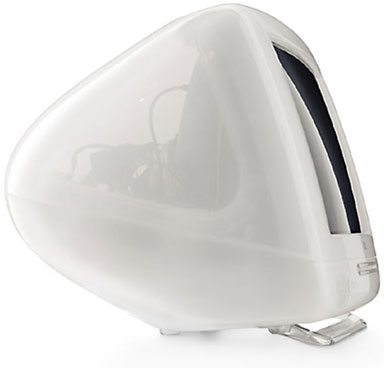 This particular iMac dated from when Apple’s product lineup had started to become confusing, back in 2000. I wasn’t quite sure which model I was dealing with, and there was no keyboard or mouse to test it with. As I paid and walked out the door, all I knew about the machine I was holding was that it was a “snow” iMac.
Upon bringing it home and booting it with a keyboard and mouse, I found that it was a 500 MHz iMac DV SE with a 30 GB hard drive and 384 MB of RAM. Not bad for $25 – but what to do with it?
The first thing I did was erase the hard drive, which had a Spanish version of Mac OS 9.2 installed on it alongside OS X 10.2.
These days, most applications have modern versions or equivalents that run on OS X, so there was no need for Mac OS 9 to be installed. I installed OS X 10.4 and did the updates to 10.4.7, which went very smoothly. I connected the machine to my network and was able to get online with Safari. Surprisingly, it didn’t run too badly, especially given that this machine is six years old.
With everything working like it should, I needed to find a use for the computer. We already have my sister’s old 450 MHz iMac DV+ set up in our family room in the attic. With an AirPort card, it’s able to pick up the wireless signal from downstairs and browse the Internet just fine.
We have a 4-year-old Sony PC downstairs in the den, which has more capabilities than this 500 MHz iMac (CD burning, better video card, bigger hard drive).
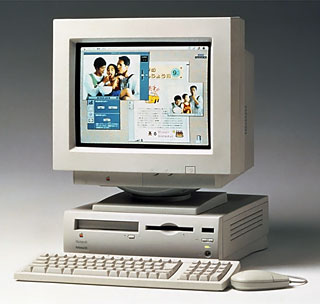 The last thought was that we give the machine to my grandparents to replace their dated Performa 630.
We’d given them the Performa years ago so they could play some simple games on it – and with the aim of eventually getting them online. When we gave them the machine, it was up-to-date enough to browse the Internet fairly comfortably and do email.
That said, they never got to the step of actually installing a phone jack in the room where the computer’s located. These days, browsing the modern Internet is outside its capabilities, and many websites require a browser that just won’t run on a pre-PowerPC Mac.
This meant the 6-year-old iMac DV SE would be perfect. Not only can my grandma continue to play cribbage and solitaire, but my grandpa can access information about his stocks through a capable and modern browser such as Safari or Firefox. With the iMac, they’ll also be able to watch DVDs, which they can’t view with their TV due to the lack of a DVD player.
The iMac’s also much more expandable than the old Performa. With USB ports, they’ll be able to use a digital camera and print their own photographs with a photo printer if they choose to in the future. Both the hard drive and the RAM can also be upgraded, and the RAM at doesn’t have the low 64 MB limit that the Performa 630 has.
In order to set them up with this iMac, I installed Classic Cribbage 2.1.1, a great cribbage game that lets you play against the computer – or another person, if you choose. I also installed MacSolitaire, which is one of the best and most flexible Klondike solitaire games for the Mac (it’s at least as good as Windows Solitaire).
I made sure that recent versions of Safari and Firefox were installed, and I also added AOL. Despite the problems everyone has with AOL, this is probably the easiest and most cost-effective way to get them online. My mother already has an account, and it’s simple to add a screen name to hers so they can access it via dialup.
The best thing about this iMac, however, is what the original iMac ads listed as a feature: the lack of cables. In fact, to get online you only need two cords – the power cord and the phone cord. Everything else is built in, and with the convenient handle on top, it’s the perfect machine for my grandparents to bring up to their summer house if they so choose.
That may be wishful thinking, but at the very least they end up with a much more modern, streamlined, and easier-to-use computer than they had before.
Keywords: #imacg3 #imacdv #snowimac
Short link: http://goo.gl/TBVDGO
searchword: snowimac
