
Low End Mac Reader Specials
TypeStyler For Mac OS X is Now Shipping! Download The Free Fully Functional 60 Day Tryout at www.typestyler.com
Don't install Parallels to play poker online! Poker Mac will show you how
to download and install a native Mac poker application such as Full
Tilt Poker Mac.
Laptop Hardware Provided by TechRestore - Overnight Mac & iPod Repairs.
Compare products like desktop computers, apple laptops, apple macs, and LCD Monitors side by side! All the information and reviews to make the best purchasing decision for new mobile phones, sat nav systems, or MP3 players. The Ciao online shopping community makes searching products easy for you.
Apple Archive
Flock, a Web Browser Designed for Bloggers
- 2005.10.31
As many of you know, I've raved about Firefox in the past. Popup blocking, RSS feeds, search from the toolbar - all things Safari has - plus extensions (like AdBlock, which you can set to block those annoying Flash ads) and themes (including one that makes Firefox look like Safari).
That's Firefox, and now there's Flock.

The Flock Menu Bar
Flock is based on Firefox. When you open it, you'll notice the familiar toolbar with search and the extensions and themes in the Tools menu, but you'll also notice a few extras. Flock is supposed to be an application for 'Web 2.0', the next-generation of the Internet, bringing the idea that Internet users should be able to modify it.

The Address Field
The first thing you'll notice about Flock is the star button next to the address field. This is Flock's new approach to bookmarks. You visit a page you like, and click on the star. It'll then ask you if you want to sign up for a del.ico.us account. Signing up for one allows you to share your bookmarks with other users on the Internet - it's a great way to share potentially interesting websites, and you only share the ones you want to.
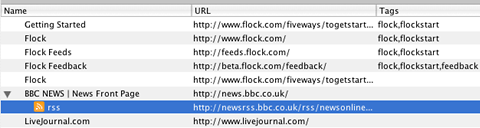
Favorites Manager
The favorites manager is great as well - it allows you to view your favorites as well as the RSS feeds for any that might have them (for example, BBC News). You can also tag certain favorites with phrases that might be helpful in finding them (short words like 'cars', 'racing', or 'motorsports').
And, like Firefox, Flock has a history search, which I've found indispensable. They claim that it's better than Firefox's (apparently the pages in your history get indexed for better searching), but I haven't found much of a difference.
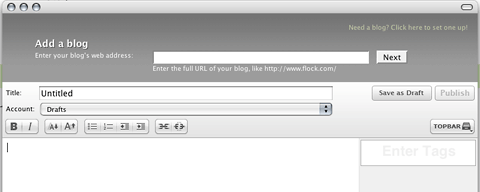
Flock's Blog Editor
The most publicized feature is the built-in blog editor. It's easily accessible from anywhere - just click the pen icon on the toolbar. If you get a great idea while browsing some obscure site, you no longer have to go back to your blog's editing page or open a separate application to write something. It works with Movable Type/LiveJournal among others.
If you use Flickr (I don't, but this feature might be enough to convince me that I should), you can add your photos on Flickr right into the blog post by dragging and dropping the image. No typing in the complicated URL, no trying to copy and paste links - just drag it right into the text box. Unfortunately it doesn't support Webshots, which is a bit more popular than Flickr currently is.
Then there's the shelf. It's a great idea - it opens up as a window where you can drag URL's, pictures, or clips of text that you want to keep on hand to blog about later.
Flock is a great concept. However, I don't think it has mass-appeal at the moment. It caters to a relatively small - but steadily growing - population of Internet users who've gotten involved in blogging and creating their own sites.
For those who's primary need for the Internet is checking email, ordering books and CDs online, and maybe paying a bill or two, I don't think Flock will offer much more to them than Firefox does.
I plan to continue watching the development of this browser. It
combines two things I like - Firefox and blogging - in one package.
Unfortunately, it's only in its 'developer preview' stage, but
there's a pretty good possibility that I might use it as my main
browser once a final release version arrives.
Recent Apple Archive articles
- iPods, notebooks, and other modern electronics more readily replaced than repaired, 12.07. Whether it's an intermittent failure or a broken display cable, more often than not it's cheaper to replace a broken electronics device than repair it.
- Options for replacing your older iPod, 11.19. Whether you've run out of space on your old iPod or want features it doesn't have, here are your options in new and used iPods.
- Could the $200 'green' PC with gOS Linux become a threat to Apple?, 11.14. The low cost, low power Everex desktop comes with a customized version of Ubuntu Linux, has a Mac-like Dock, and sells for $400 less than the Mac mini.
- Leopard different, a bit buggy, but worth the upgrade, 11.02. Leopard on a Power Mac G4 and a MacBook Pro: It runs well on both computers, but each has some odd bugs, and some of the changes are a step backwards.
- More in the Apple Archive index.
Links for the Day
- Mac of the Day: 17" MacBook Pro Core Duo, Apr. 2006 - The top-end MacBook Pro includes a 1680 x 1050, 2.16 GHz Core Duo CPU, and supports Apple 30" Cinema Display.
- Group of the Day: G4 List is for those using Power Mac G4s or G4 upgrades.
- Support Low End Mac
Recent Content on Low End Mac
- Pismo WiFi Networking Issue Finally Solved?, Charles W. Moore, Miscellaneous Ramblings, 11.24. It turns out the problems wasn't the Pismo, the Buffalo WiFi card, or Mac OS X 10.4. It was the Wireless G router - Linksys to the rescue!
- Mini VGA to S-video Adapter a No Go for eMacs, Dan Bashur, Apple, Tech, and Gaming, 11.24. You might think that Apple's Mini VGA S-video adapter is a cheap way to connect your eMac or G4 iMac to your TV. You would be wrong.
- Google Calendar with iPhone or iTouch Is Great for Scheduling, John Hatchett, Recycled Computing, 11.24. Web-based Google Calendar allows access and updates from any computing platform, including Mac, Windows, Linux, and iPhone OS.
- Why Spaces is My Favorite Leopard (and Snow Leopard) Feature, Charles W. Moore, Miscellaneous Ramblings, 11.23. Spaces, a feature introduced with OS X 10.5, is like having several monitors on your Mac without the cost and space of using multiple displays.
- i5 iMac Benchmarked, Mac mini 'Shouldn't Be Overlooked', Twitter Client for Classic Mac OS, and More, Mac News Review, 11.20. Also why Apple leaves the low end to others, 10.6.2 fixes video playback problem in 27" iMac, 3D Leopard and Snow Leopard performance, and more.
- Apple's Tablet an End Run Beyond Netbooks, Frank Fox, Stop the Noiz, 11.20. Whatever Apple has planned will leverage existing technologies while going beyond what its competitors can offer.
- Apple #4 in Reliability, Apple Tablet a Gadget for All?, HP's i7 Notebook Outdoes Mac Rivals, and More, The 'Book Review, 11.20. Also Flash 10.1 improves video on Hackintosh netbooks, thin-and-light notebooks impress, Windows XP finally on the way out, and more.
- NASA Chemical Sensor for iPhone, Smartphone Death Match, iPhone Earrings, and More, Ian R Campbell, 11.20. Also mobile phone dangers, new apps, GPS solution for iPod touch, new iPod and iPhone cases, and more.
- More links in our archive.
Recent Deals
- Best iPod nano Deals, 11.25. Refurb 8 GB 4G nano, $99; new, $126; refurb 16 GB, $129; new, $150; new 5G/8 GB, $134.60; 16 GB, $161.12. Shipping included.
- Best Classic Mac OS Deals, 11.25. System 6.0.8 floppies, $10; 7.1, $12; 7.5, $20; 7.6 $13; 8.1, $11; 8.5, $20; 8.6, $90; 9.0, $20; 9.2.2, $30.
- Best 15" PowerBook G4 Deals, 11.25. Used 1 GHz Combo, $400; 1.5 GHz SuperDrive, $449; 1.67 GHz hi-res, $600.
- Best G4 iMac Deals, 11.24. Used 15" 700 MHz CD-RW, $150; 800 MHz Combo, $229; 1 GHz, $289; 17" 1.25 GHz, $200; 20" 1.25 GHz, $509.
- Best MacBook Air Deals, 11.24. Used from $899; refurb from $1,099; new 1.6 GHz/120 HD, $1,150 after rebate; 1.8/64 SSD, $1,150 a/r; 1.86/128 SSD, $1,350 a/r; 2.13/128 SSD, $1,694 a/r.
- Best PowerBook G3 Deals, 11.24. Used 233 MHz WallStreet, $75; 266 MHz, $160; 400 MHz Lombard, $199; 400 MHz Pismo, $289; 500 MHz, $350.
- Best 12" PowerBook G4 Deals, 11.23. Used 867 MHz SuperDrive, $348; 1 GHz Combo, $379; SD, $519; 1.33 GHz, $529; 1.5 GHz Combo, $549; SuperDrive, $609.
- Best Mac Pro Deals, 11.23. Used 2.66 GHz 4-core, $1,300; 3.0 4-core. $1,919; refurb 2.66 4-core Nehalem, $2,149; 2.93, $2,549; 2.93 8-core, $4,999; new 2.26 8-core, $2,290.
- Best Time Capsule and AirPort Deals, 11.23. Used 802.11g AirPort Extreme, $49; 500 GB Time Capsule, $150; new, $190; 1 TB dual-band, $280; 2 TB, $469; 802.11n AirPort Extreme, $170.
- More deals in our archive.
About LEM | Support | Usage | Privacy | Contacts
Navigation
Used Mac Dealers
Apple History
Video Cards
Email Lists
Favorite Sites
MacSurfer
MacMinute
MacInTouch
MyAppleMenu
InfoMac
Macs Only!
The Mac Observer
Accelerate Your Mac
RetroMacCast
PB Central
MacWindows
The Vintage Mac
Museum
DealMac
DealsOnTheWeb
Mac2Sell
ramseeker
Mac Driver Museum
JAG's House
System
6 Heaven
System 7 Today
the pickle's Low-End
Mac FAQ
Abandonware
Petition
Mac vs. PC Info
Affiliates
The Apple
Store
Mac
Connection
B&H
MacMall
TechRestore
ExperCom
Crucial
Memory
batteries.com
Advertise
MacMinute
MacInTouch
MyAppleMenu
InfoMac
Macs Only!
The Mac Observer
Accelerate Your Mac
RetroMacCast
PB Central
MacWindows
The Vintage Mac
Museum
DealMac
DealsOnTheWeb
Mac2Sell
ramseeker
Mac Driver Museum
JAG's House
System 6 Heaven
System 7 Today
the pickle's Low-End
Mac FAQ
Abandonware
Petition
Mac vs. PC Info
Mac Connection
B&H
MacMall
TechRestore
ExperCom
Crucial Memory
batteries.com

