
Apple Archive
Adium, a Great Free Multiservice Chat Client for OS X
- 2004.12.20
Certain applications you can keep installed on your machine, using them trouble-free for years. However, applications that depend on the Internet are not like that. As people who've tried to get, say, a Macintosh SE on the Internet will tell you, it's basically useless on the Internet because the Internet has forced even the newest applications the SE can run into obsolescence.
The Internet has now done the same for the latest Mac version of AOL Instant Messenger. Sure, it can still be used - but the features it has are nowhere close to being on par with IM clients from other companies. On the PC, I use Trillian from Cerulean Studios. It offers more features than the AOL IM client (such as support for skins, conversation logging/previous conversation display, tabbed windows/containers, etc.) and also offers support for MSN and Yahoo, which means that I don't need to have three applications open at once - an added plus.
When I put OS X on my G3, I wanted an IM client up to the standards of Trillian. Unfortunately, Cerulean doesn't offer a Mac version of its product, but where there's a market for a product, some company usually ends up stepping in to offer it.
In this case, that product's free.
Adium is available free of charge; supports AIM, MSN, Yahoo, ICQ, and more; and it blends in nicely with Mac OS X.
I tried out Adium when it first came out and wasn't terribly impressed. It seemed to be lacking a lot of features and had a relatively simple interface. That's nothing like what Adium has become, and if you haven't tried it recently, you're missing out.
So, why's it so great?
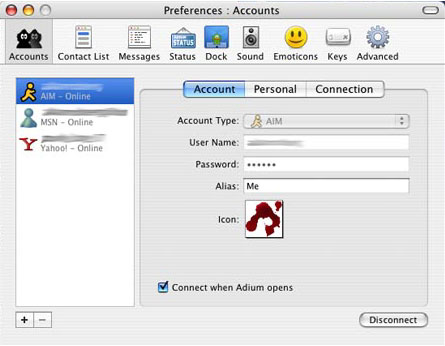
The preference panel is organized very similarly to the Mac OS X System Preference panel, which makes it easy to find your way around.
Adium allows for more than just one account (unlike AOL's AIM for Mac, with which you can only be signed on to one account at a time), and with Adium, as with Trillian, you can be signed onto AOL, MSN, and Yahoo at the same time.
Adium allows for aliases (similar to iChat in that respect) and now supports profiles in AIM (under 'Personal').
You can also select the "style" of the message windows that you prefer, and Adium gives you six basic types with about 20 different sub-layouts of those types. You can set your font, colors, size, whether or not to log IM's, and if you want to use tabbed windows. You have control over whether the dock icon bounces annoyingly on incoming messages, and you can choose the style of emoticons (I quite like the default ones) - or you can disable them completely.
Adium also gives you a host of advanced options, such as how Adium behaves with your address book (built in to Mac OS X), how it treats aliases, displays old messages, and much more. Basically, Adium gives you more options than you could possibly think to use. And it doesn't forego stability for features.
I've only found two downsides so far. Firstly, when receiving files, it doesn't tell you what percentage of the file has been received (all other IM clients that I've used do), so you need to rely on the other person to tell you when the file's done.
Secondly - and probably partly because of all of the features it offers - Adium does seem to be a bit slow, especially on older computers like my 350 MHz G3. I installed it on my 867 MHz 12" PowerBook, and it seemed tolerable, but it's still not speedy. I suppose if you have a G5 it wouldn't feel slow at all.
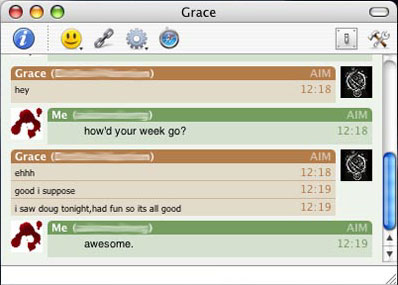
chat window using Mockie style
Fortunately, Adium gives you the choice to disable a lot of different settings (such as it highlighting people's usernames while they're typing) that are enabled by default, and you can always select a simpler message display style (I use Mockie for my message windows, and "standard (small)" for my contact list).
If you need a good, reliable client that supports more than just one IM service, give Adium a try.
About LEM Support Usage Privacy Contact
Follow Low End Mac on Twitter
Join Low End Mac on Facebook
Favorite Sites
MacSurfer
Cult of Mac
Shrine of Apple
MacInTouch
MyAppleMenu
InfoMac
The Mac Observer
Accelerate Your Mac
RetroMacCast
The Vintage Mac Museum
Deal Brothers
DealMac
Mac2Sell
Mac Driver Museum
JAG's House
System 6 Heaven
System 7 Today
the pickle's Low-End Mac FAQ
Affiliates
Amazon.com
The iTunes Store
PC Connection Express
Macgo Blu-ray Player
Parallels Desktop for Mac
eBay

