
Apple Archive
Don't Confuse a Pretty Interface for an Easy or Efficient Operating System
- 2003.05.16
When the Macintosh was new, it was a welcome relief from the world of DOS, CP/M, and the Apple II, where you had to know quite a bit about the computer in order to get it to work the way you wanted. It was simple to open applications, navigate through directories, and controls and menus were mostly self-explanatory.
You didn't need to spend hours memorizing commands - and even more hours trying to input the correct command to ensure that the document you printed out showed bold and italic text where you wanted it.
Working with files was easy, too. An icon with a paintbrush on it would open in MacPaint. An icon with a "W" on it would open in Word. It was simple.
Early versions of Windows were even fairly easy to use. Applications had simple menus, and it was easy to close a window simply by double clicking in the upper left hand corner.
With Windows 95, Microsoft tried to introduce too many features at once while at the same time trying to keep the simplicity of the old system. It didn't work very well - things suddenly got complicated and required a much more extensive help system.
The Mac didn't really get an extensive help system until System 7.5, and in Mac OS 8 it was much more prominently placed (new computers with OS 8 installed featured icons for Help on the desktop). However, Apple kept the same basic interface design for years - from System 6 to Mac OS 9.2, windows, menus, icons, and system behavior (i.e., when you select one window, the entire application comes to the front) remained the same.
It didn't require someone with extensive knowledge to use a Mac, and if you'd used one, you could use any Mac running any OS version. The big plus for the Mac was that things looked and acted pretty much the same in different OS versions - until OS X changed everything.
The problem with Windows 95 was that it aimed to make Windows 3.1 users comfortable while also hoping to get users to become comfortable with the new style. The style I am referring to consists of three (close, minimize, maximize) buttons in the upper right corner of a window, as well as the start menu and taskbar.
The issue was that while it had those three buttons, you could still close a window by double clicking the window icon on the left (which is how I still do it in Windows) or selecting File: Close.
The start menu and taskbar was great - probably the best thing Microsoft's done - however, they still left the Program Manager intact in Windows 95 and 98. "I thought my applications were only in the start menu,"' a user might say, while finding the same icon in Windows Explorer, the Program Manager, and the start menu.
This was acceptable in Windows 95, as it was a "transition" OS. However, two years later, when 98 came out, it had the same "extra" features as 95 did, as well as a bunch more. (And don't get me started on Millennium Edition.)
What Apple really did right with the Mac OS was give you one way to do things. When you want to change network settings, you go through the control panel (or system preferences), and all settings related to the particular item are in one place, unlike Windows, where there are often several control panels, wizards, or properties dialogue boxes to configure one item, such as a home network.
But to be fair to Microsoft, they have tried to "dumb down" Windows a little bit in attempt to gain the label of "easy to use." Just take a look at the "File and Folder tasks" box in Windows Explorer in Windows XP. "Rename this folder," "move this folder," "copy this folder," "share this folder," and "E-mail this folder" are a few of the options you have. It's funny; you also get most of these by right-clicking the folder. And if you're really smart, you can even actually drag the folder into another folder to move it.
Am I stupid or what?
I don't need an application, an operating system, or anything else to be intrusive to the point where it actually annoys me. Some of these items you can turn off, but the fact is that these "extra features" need not be here in the first place. To make a computer and operating system user friendly, there need to be fewer buttons, fewer options, and fewer connectors. Less is more.
Apple is partially on the right track. They have the "fewer buttons" and "fewer options" thing down, as well as the "fewer connectors" (on their computers). The mistake both Apple and Microsoft are making now is the assumption that if they make the OS pretty, people will buy it and enjoy using it. Right now, with Windows XP's multiple colors, it feels like I'm playing the latest Bob the Builder kids game, even though all I'm doing is typing in Word, listening to the Spoons in Winamp, and chatting with a few friends in AIM.
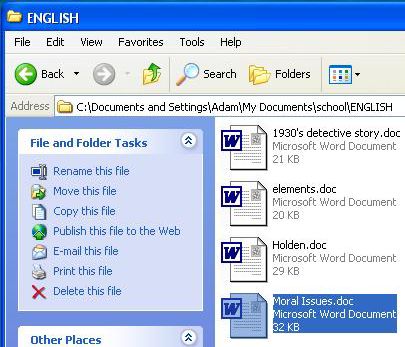
The Prettification of Windows
I think part of the whole "bright colors, awesome effects" thing is to get people to say, "Wow, Windows/Mac OS is back and completely new." It's the "fresh start" idea, and I do understand that it can be a great idea in terms of marketing.
But now it is time for both companies to get back to business. Simplify the interface. Don't concentrate on the effects and "ease of use" features. Make it work, and make it work well.
The fading menus and cool colors are great, but they doesn't mean a thing when you've got a report due and the computer keeps crashing when you try to spell check the document.
About LEM Support Usage Privacy Contact
Follow Low End Mac on Twitter
Join Low End Mac on Facebook
Favorite Sites
MacSurfer
Cult of Mac
Shrine of Apple
MacInTouch
MyAppleMenu
InfoMac
The Mac Observer
Accelerate Your Mac
RetroMacCast
The Vintage Mac Museum
Deal Brothers
DealMac
Mac2Sell
Mac Driver Museum
JAG's House
System 6 Heaven
System 7 Today
the pickle's Low-End Mac FAQ
Affiliates
Amazon.com
The iTunes Store
PC Connection Express
Macgo Blu-ray Player
Parallels Desktop for Mac
eBay

