
Apple Archive
The New PowerBooks, iLife, and Pros and Cons of Safari
- 2003.01.10
You've probably read about what was released at Macworld Expo. I wasn't really expecting any of this. I was expecting an updated iMac and some sort of new iPod. I think, however, what we ended up getting is better.
12" PowerBook
The 12.1" PowerBook is fabulous. This is exactly what I - and
probably many others - have been hoping Apple 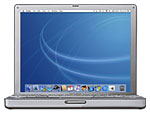 would produce. Something small and
light, yet with all the power of the G4 processor. This is a great
computer for college students who need power and portability. It's
also nice that Apple offers this without the SuperDrive by default,
since I suspect most users won't need it.
would produce. Something small and
light, yet with all the power of the G4 processor. This is a great
computer for college students who need power and portability. It's
also nice that Apple offers this without the SuperDrive by default,
since I suspect most users won't need it.
17" PowerBook
This one puzzles me. The idea is nice, but I think that a 17"
screen in a laptop is a bit impractical. 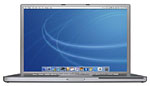 This seems to be a "keeping up with the
Joneses" sort of product - now that PC laptops have 16" screens,
Apple has to have a 17" screen on theirs. I do think that this
model has some other great features, though. The automatic sensor
for screen brightness and the keyboard backlight are excellent
ideas. Recent IBMs include a light that shines on the keyboard to
illuminate it, but I think Apple's solution is better - and
definitely much more elegant. The faster FireWire is nice to have,
too.
This seems to be a "keeping up with the
Joneses" sort of product - now that PC laptops have 16" screens,
Apple has to have a 17" screen on theirs. I do think that this
model has some other great features, though. The automatic sensor
for screen brightness and the keyboard backlight are excellent
ideas. Recent IBMs include a light that shines on the keyboard to
illuminate it, but I think Apple's solution is better - and
definitely much more elegant. The faster FireWire is nice to have,
too.
iLife
Apparently Apple has a thing for charging its customers for
software that was once free. Of course, I'm not complaining too
much  about this one. It's only $49, and you not only
get an updated version of iMovie (which used to cost that much by
itself), but iDVD also as well as iPhoto and iTunes on the same
disc. The only iApp I really use is iTunes, and that's still a free
download, so I don't think I'll be buying this bundle. But for
someone who makes extensive use of iMovie and/or iDVD, I think it's
not a bad deal.
about this one. It's only $49, and you not only
get an updated version of iMovie (which used to cost that much by
itself), but iDVD also as well as iPhoto and iTunes on the same
disc. The only iApp I really use is iTunes, and that's still a free
download, so I don't think I'll be buying this bundle. But for
someone who makes extensive use of iMovie and/or iDVD, I think it's
not a bad deal.
Safari
This is the last thing I expected from Apple. It's been a while
since I've used an Apple browser (the last one was the failed
Cyberdog),  and this one's got some potential. There are some bugs
that need to be fixed first, however.
and this one's got some potential. There are some bugs
that need to be fixed first, however.
The toolbar buttons are too small, and the back and forward buttons too close to the window controls. I've closed or miniaturized the window by accident several times when attempting to click the back button. Apple needs to offer an option in preferences to make the size of the buttons larger. Text labels would also be nice.
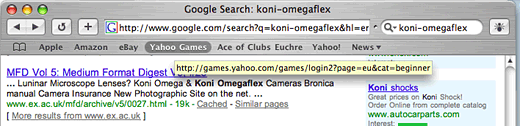
The other complaint: I can't import bookmarks from OmniWeb or Netscape. This is a big issue for me, since I have several hundred bookmarks all sorted into folders in OmniWeb, and I'm not about to go and enter them all manually into Safari.
The speed claims are also exaggerated. Yes, it's faster than IE, but not by too much. It just loads pages differently. IE often loads pages by displaying them as it loads, Safari loads it and displays the finished page, more like the way Netscape works.
Safari also has issues displaying some sites properly. For example, the BBC News page (screen captures below) looks awful if you try to scroll down. Why? It has scrolling text at the top of the page that seems to stay on the screen as you move the page down.

Notice LATEST: Man in court.... in
below image

Safari may be the fastest Mac browser, but I find that IE on Windows is almost twice as fast. I think that Safari really has potential and am looking forward to using the final version when it comes out. I am also looking forward to see what Microsoft will release in response, now that it has some serious competition on the Mac platform.
Overall the Macworld announcements were pretty pleasing. I'm especially anxious to see the sales figures on that 12" PowerBook. I have a feeling it's really going to do well.
The only thing that disappointed me is that there were no PowerBook speed bumps. Now, I know that Apple isn't going to want to increase the speed on their laptop when their desktops top off at 1.25 GHz, but PC notebooks are getting faster and faster - and Apple is definitely behind in the speed game.
Unfortunately, the days of Apple having the fastest laptop on the planet (3400) are over, but the G4's other features offer some compelling reasons to buy it instead of a PC notebook.
About LEM Support Usage Privacy Contact
Follow Low End Mac on Twitter
Join Low End Mac on Facebook
Favorite Sites
MacSurfer
Cult of Mac
Shrine of Apple
MacInTouch
MyAppleMenu
InfoMac
The Mac Observer
Accelerate Your Mac
RetroMacCast
The Vintage Mac Museum
Deal Brothers
DealMac
Mac2Sell
Mac Driver Museum
JAG's House
System 6 Heaven
System 7 Today
the pickle's Low-End Mac FAQ
Affiliates
Amazon.com
The iTunes Store
PC Connection Express
Macgo Blu-ray Player
Parallels Desktop for Mac
eBay

