
Apple Archive
BeOS Past, Present, and Possible Future
- 2002.06.28
One of the most frequently forgotten operating systems is BeOS, the Be Operating System. This operating system was originally developed for the unique BeBox, later rewritten for the Power Macintosh, and finally ported over to the x86 platform. In the end development was only for the x86.
As one of their last efforts to show the world how great BeOS was, Be released a free version of their OS known as BeOS 5 Personal Edition. This version could be installed from within Windows 95, 98, Me, NT, or 2000 and would not effect the Windows installation.
To run the OS, you could simply click on the "Start BeOS 5" icon in the Start menu. This would then launch you into BeOS, or, in Windows 2000, ask you to insert the startup disk (which it would create during the actual installation) and then restart your computer.
After the BeOS 5 splash screen, you would see the desktop - or the "Tracker," as Be calls it. At first glance, it doesn't look much different than Windows or the Mac OS. Open up a window, and you will an immediate difference, however. The window's yellow title bar acts more like a tab - it doesn't cover the entire expanse of the window.
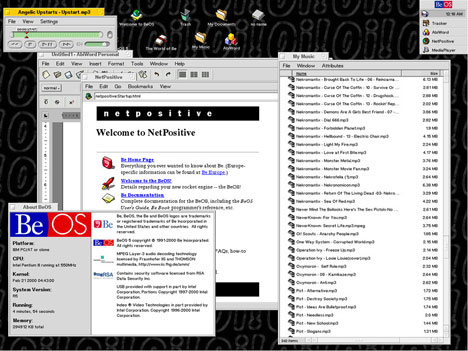
Reduced screen shot. Click image to see full sized 800 x 600, 136K
image.
Like Windows and Mac OS X, the windows support solid/active window dragging and resizing. As in Windows, the menu bars are positioned below the title bar of each window.
Like the Mac OS, hard drives appear on the desktop. Shortcuts can be placed on the desktop, just like in other operating systems, and you can change the desktop picture or pattern, just like any other graphical OS currently available.
But what is actually different about BeOS? First of all, it is fast. In fact, it is the fastest full-featured operating system that I have ever used. Windows open instantly, and my favorite: Double click an MP3 file and it will open Media Player and start playing with no delay whatsoever.
Want to browse the Internet? NetPositive opens like it is just another folder. In fact, all applications open so quickly that you'd just think they were folders. This, to me, is how an operating system should act.
Unfortunately, there are some downfalls that come with BeOS 5. There are many Ethernet cards and modems that will never be supported (my Network Everywhere NIC happens to be one of them), so if you want to get online, you may have to buy a different NIC or modem.
- Why do I say "never supported"? Because Be, Inc. is out of business. Running BeOS means that you have no support or other assistance available. Some drivers are able to be downloaded online, but for most things, you're on your own. While it supports USB on the PC, the Mac version does not work with USB or FireWire cards, and is only compatible with a small amount of 603e and 604e based PowerMacs and clones.
This doesn't mean you can't use BeOS if you have compatible hardware. There are loads of free applications available, just waiting for you to download them. Check out www.bebits.com for some of them. You can even get themes to customize the user interface and the Be menu.
The greatest thing about BeOS is that it does not require a fast computer. According to the documentation, a Pentium 90 PC with 32 MB of RAM is enough. That means that it may work in Virtual PC on the Mac. Keep in mind that I haven't tried this, and if you want to try it, it would be "unsupported" (If you get it working, I'd love to know).
I believe that BeOS was the best desktop OS ever made (and I know some of you will argue with me), however it really never made it. What manufacturer would risk ruining their company by installing BeOS instead of Windows on their machines? Why should Apple sell machines with BeOS when they already make the Mac OS?
Now that Palm and Be are one, I hope to see some BeOS related elements become part of Palm OS 6.0 (hopefully coming in 2003). Because it was designed to be a multimedia OS, it should be able to use whatever power Palms have efficiently so that they can compete better with Pocket PC offerings.
Further BeOS Reading on LEM
- Apple's Next Direction, Dan Knight, Mac Musings, 1999.08.02
- BeOS or NeXT: Did Apple Make the Wrong Choice?, Jonathan Ploudre, Back & Forth, 2001.04.16
- BeOS or NeXT: The Right Choice, David Puett, My Turn, 2001.04.18
- BeOS and BFS, Jonathan Ploudre, Back & Forth, 2001.04.20
- User Interface: Mac vs. BeOS, Jonathan Ploudre, Back & Forth, 2001.04.23
- Using BeOS on a Power Mac: A modern OS for an older Power Mac, Jonathan Ploudre, Back & Forth, 2001.04.30
- NeXT: Apple's Right Choice, Jonathan Ploudre, Back & Forth, 2001.05.07
- Why BeOS Was So Different, Dan Knight, Mac Musings, 2002.01.02
- Why BeOS Lost, Chris Lozaga, My Turn, 2002.04.03. BeOS was a great operating system, but you can't blame Microsoft, Apple, or NeXT for its failure.
About LEM Support Usage Privacy Contact
Follow Low End Mac on Twitter
Join Low End Mac on Facebook
Favorite Sites
MacSurfer
Cult of Mac
Shrine of Apple
MacInTouch
MyAppleMenu
InfoMac
The Mac Observer
Accelerate Your Mac
RetroMacCast
The Vintage Mac Museum
Deal Brothers
DealMac
Mac2Sell
Mac Driver Museum
JAG's House
System 6 Heaven
System 7 Today
the pickle's Low-End Mac FAQ
Affiliates
Amazon.com
The iTunes Store
PC Connection Express
Macgo Blu-ray Player
Parallels Desktop for Mac
eBay

