
Apple Archive
The Value Pre-G3 PCI Power Macs
- 2002.06.07
The time to buy a used PCI Power Mac might be now. With Mac OS X requiring a G3 or faster, people are starting to dispose of their pre-G3 PCI Power Macs.
While these are aging, they still can be great backup machines. I use a 9600/233 in my room for basic Internet, email, and word processing, which is completely within the capabilities of the machine. In fact, it even does a decent job with graphics applications and playing back QuickTime movies.
That was at the top of the line of the pre-G3 PCI Macs, but what about the other end? I am leaving out the 7200, since this machine did not use daughter cards and had a different logic board than the rest of the PCI models.
At the lower end of the spectrum were the 7500 and 7600. The 7500 offered AV ports, and a 100 MHz PowerPC 601 processor - the only daughter card upgradeable Power Mac to use a 601. The 7600 used a 604 processor running at 120, 132, or 200 MHz, which is actually quite a bit more powerful than the 7500's 100 MHz 601. Other than the processor, AV jacks, and label on the front, the 7600 logic board is the same as the one in the 7500.
These older Power Macs can really be great machines if upgraded correctly. Does this mean sticking in a G4 and adding a 80 GB hard drive? Not necessarily. In fact, you may be able to make do with the stock processor or another 604e at a higher MHz rating.
I have a 7500 set up downstairs, which my sister uses for Internet access and homework assignments. It was upgraded was a 200 MHz 604e processor, 112 MB of RAM, and 1 GB and 2 GB hard drives. It runs well, and its performance surprises me. I am constantly amazed when my sister downloads the latest movie trailer, and I see it playing smoothly on a six-year-old computer. It also amazes me to see her running the visualizations in iTunes - full screen - with very little slowdown.
I use my 9600 for much simpler tasks. The majority of the time I am typing up research papers or other homework, and I am often running AOL Instant Messenger, Netscape, or Internet Explorer in the background. I see zero slowdown, except for the fact that the Internet connection that this machine uses is not optimal (a 33.6 modem).
Out of curiosity, I decided to try the game "The Sims" on my
9600. The requirements state that the game 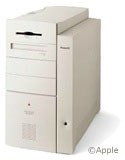 requires a G3 at 233 MHz or faster, 64 MB RAM
with virtual memory (128 recommended), and a 2 MB accelerated
video card ( 4 MB recommended). I installed the program and
soon found that it ran better on my 9600 than it had on my old
beige G3! Not only was the video faster, but the game loaded faster
in general, and things felt much more responsive.
requires a G3 at 233 MHz or faster, 64 MB RAM
with virtual memory (128 recommended), and a 2 MB accelerated
video card ( 4 MB recommended). I installed the program and
soon found that it ran better on my 9600 than it had on my old
beige G3! Not only was the video faster, but the game loaded faster
in general, and things felt much more responsive.
That sold me on the power of the 604e processor. While it's not for power users who need G3 or G4 power, it's an excellent choice if you just need a backup machine for the Internet.
My recommendation for a decent pre-G3 Power Mac would be a used 7500, upgraded with a 200 or 233 MHz 604e processor (Apple's 300 and 350 MHz versions only work in the 9600/300 and 9600/350) and at least 96 MB of RAM. Load OS 9.1, and you've got a great machine for Web browsing, which will be able to access any site that your newer G3 or G4 can.
If you don't mind spending more, the 8600 or 9600 series are excellent. The case is simply amazing in terms of ease of upgrading, and there is room on the front for three drives - and more room inside for hard drives. The 9600 comes with 6 PCI slots, so you have very few limits to expandability. This unfortunately keeps 9600 prices high, as Apple has yet to produce another Mac with 6 PCI slots, which some people actually need.
Don't pay over $300 for a used 9600/233, and don't pay over $100 for a 7500. Often you can get 7500's for as little as $50 with no RAM or hard drive. The 8500 and 8600 fall in the middle, selling at about $150 and $250, respectively.
There is a pre-G3 PCI Power Mac for almost every budget. If you need a second computer, one of these machines might be perfect.
About LEM Support Usage Privacy Contact
Follow Low End Mac on Twitter
Join Low End Mac on Facebook
Favorite Sites
MacSurfer
Cult of Mac
Shrine of Apple
MacInTouch
MyAppleMenu
InfoMac
The Mac Observer
Accelerate Your Mac
RetroMacCast
The Vintage Mac Museum
Deal Brothers
DealMac
Mac2Sell
Mac Driver Museum
JAG's House
System 6 Heaven
System 7 Today
the pickle's Low-End Mac FAQ
Affiliates
Amazon.com
The iTunes Store
PC Connection Express
Macgo Blu-ray Player
Parallels Desktop for Mac
eBay

