
Apple Archive
A Brief History of Portable Computing
- 2002.03.22
Portable computers have been around for over 20 years, allowing users to do their work almost anywhere. Some of the early portable computers, such as the pioneering Osborne 1, were very heavy and had to be plugged into an AC outlet to function.
Later on, companies starting adding batteries to portable computers, giving users the ability to use their computers in places where there is no power. Some of the early portable computers were the KayPro, Compaq Portable, and Apple //c.
Eventually, the idea came about to put this technology into a smaller package and run it with batteries. The Radio Shack TRS-80 Model 100 is often considered the first "laptop" computer.
Later on, the design changed and laptops came with a screen doubling as a lid, closing over the keyboard below it. Among these were the Toshiba T1000, sometimes called the first real laptop.
Soon other companies found ways to make the package smaller and more portable. Among these smaller computers were the Compaq LTE 286 and the Apple PowerBook 100.
Compared to the others, the PowerBook 100 was lighter, had a
better battery, and even included a built in 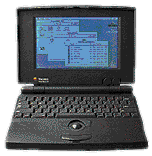 pointing device. It also had a faster and more
efficient processor than many of the 286 and 386 PC compatibles
(some ran as slowly as 8 MHz). The PB 100 was also reasonably
priced compared to some of the PC portables that were
available.
pointing device. It also had a faster and more
efficient processor than many of the 286 and 386 PC compatibles
(some ran as slowly as 8 MHz). The PB 100 was also reasonably
priced compared to some of the PC portables that were
available.
The standard design had become something like the laptops of today, but there were a couple companies out there that tried to make a better laptop computer. Among them was the Outbound Laptop, one of the first Mac clones. It was encased in a box similar to that of other portable computers.
Powered by a standard video camera battery, the Outbound featured a 12 MHz Motorola 68HC000 processor, 1 to 4 MB of RAM, and either an internal 20 MB hard drive or an internal 1.44 MB floppy, as well as an optional RAM disk as large as 16 MB. The Outbound came with a detachable IR keyboard and pointing device, as well as the ability to connect to a Mac SE or Plus and use both monitors and the processors in both machines to become twice as fast as when run alone. The keyboard and pointing device came down in one piece from in front of the screen, and a stand would fold out from the back so that the screen could be tilted at an angle.
After developing a style, companies had to do several things. First, they needed to come up with some features to make these portable computers compelling to those who depended on some of the functionality of a desktop computer. Among the first of these was a color screen. Dell's 386 models offered a color display, as did IBM's ThinkPad 360 series and Apple's PowerBook 165c and 180c.
But color wasn't enough. People wanted to be able to communicate with their desktop computer and send faxes as well. Apple had an optional fax modem in the PowerBook 100 series, and Compaq had that option in its 386 and 486 portables.
What had to come next was a name. Some companies had these already, such as IBM with its ThinkPad name and Apple with PowerBook (in my opinion, these are the two best names out there). Other companies, such Gateway, Compaq, and Dell, were still using "386" and "486" in the model name. Gateway chose to adopt "Solo," Compaq chose "Armada" for some of its machines, and Dell chose "Latitude" for its high-end portables.
Now that these portables had catchy names and a decent set of features, all that remained was price.
Laptops were always very expensive, and remained expensive until
Apple introduced the PowerBook 150,
which 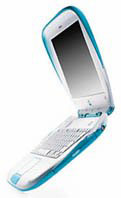 in 1995 was very affordable at $1,450,
although it lacked features that some users demanded.
in 1995 was very affordable at $1,450,
although it lacked features that some users demanded.
In 1999, Apple again introduced a reasonably priced laptop. The iBook, at $1,599, was inexpensive and designed just for those looking to start out with a portable computer or those going to school not wanting to risk damaging a more expensive model.
In 2001, Apple topped this with the iBook (dual USB) for $,1299. Coming with twice the RAM and three times the hard disk space of the original iBook, the new iBook looked like it could hardly be beat in price.
However, IBM managed to do just that. Its ThinkPad R30 series, starting at $929, comes with a 13.3" screen, a 900 MHz Celeron processor, a 10 GB hard drive, and 128 MB of RAM. Of course, like the base model iBook, it is meant for those on a budget, but both it and the Apple iBook prove that portable computing technology is now inexpensive enough for schools, students, and home users.
About LEM Support Usage Privacy Contact
Follow Low End Mac on Twitter
Join Low End Mac on Facebook
Favorite Sites
MacSurfer
Cult of Mac
Shrine of Apple
MacInTouch
MyAppleMenu
InfoMac
The Mac Observer
Accelerate Your Mac
RetroMacCast
The Vintage Mac Museum
Deal Brothers
DealMac
Mac2Sell
Mac Driver Museum
JAG's House
System 6 Heaven
System 7 Today
the pickle's Low-End Mac FAQ
Affiliates
Amazon.com
The iTunes Store
PC Connection Express
Macgo Blu-ray Player
Parallels Desktop for Mac
eBay

