
Apple Archive
OS X: Time to Upgrade?
- 2002.01.11
Now that the new Macs are shipping with Mac OS X as the default operating system, should you rush to install this "advanced operating system" on your machine?
Is OS 9 dead now that OS X is the default on all new Macs?
No. Even though the new Apple iPhoto only runs on OS X and most of the major software companies have OS X versions of their products, what Apple doesn't make obvious is that in most cases there is an OS 9 version of the product.
For example, Virtual PC 5 is announced as Mac OS X-compatible, but only in small print does it say that it runs on OS 9 as well. Office v.X is only for OS X, but the almost identical Office 2001 runs on OS 9. Same with AOL, Now Up-to-Date and Contact, iMovie, and many others.
Apple is clearly trying to get you to adopt OS X, but is it practical for you? Should you consider it?
There are a few different ways that the issue needs to be looked at. The first is your computer setup, second are your peripherals, and third is the software that you already own.
While I bet all of us would love to say we just ordered a new
867 MHz G4 or one of those new
flat panel iMacs, 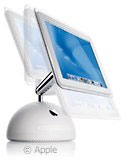 for most of us this probably isn't going to be
happening all that soon.
for most of us this probably isn't going to be
happening all that soon.
What is the "average" Mac in use at home? That's hard to say, but based on what people that I know use, I am going to guess somewhere around a 350 MHz G3. Many people still have older iMacs, beige G3s, or 604e-based Power Macs. Then there are a large number that have 400 or 500 MHz iMacs, G3s, or early G4s. And then, of course, the elite few have recent 800 or 867 MHz G4s.
Assuming that 350 MHz is about average, is OS X practical? Well, OS X doesn't run badly at 350 MHz - how well it runs depends more on how much RAM you have installed than on CPU speed. For OS X you will want 256 MB or more, and many users don't have this amount - or anywhere close to it - so upgrading to OS X involves some upgrades to your hardware, too. Not everyone will feel comfortable doing this on their own, especially if they have an older iMac.
How about your peripherals? Is that SCSI scanner OS X compatible? How about that printer ?
Most SCSI devices (apart from hard drives) are not OS X compatible. Even a number of USB devices aren't ready for OS X. Make sure you check the manufacturer's website for this information. There isn't much that is worse than upgrading your OS and then finding that nothing works the way it used to.
How about the software that you already own? Many people find that they don't need to buy the current version of every program to be productive. I use version 3.6 of Now-Up-To-Date, because I have no reason to buy a newer version. I believe the current version is 4.0, but since I don't use all of the features of the version I have, why should I upgrade to a later version?
If all of the programs that you own are "classic" (not carbonized) programs, you may want to wait to upgrade to OS X. If you haven't bought new versions of your programs in several years, you might consider buying the OS X compatible versions and making the switch, especially if you are frustrated with OS 9's pathetic multitasking abilities and the crashes often associated with misbehaving extensions and control panels (which is why I was glad to upgrade).
If you have the hardware, the drivers for your peripherals, and the software (or you are willing to buy new versions of whatever you may need), I suggest upgrading to OS X soon. If your hardware is older, drivers aren't available for your peripherals, and the majority of your software isn't OS X compatible, you may want to stay with OS 9 for a while.
It's not as if OS 9 is dead. Far from it, in fact. Programs are constantly coming out for 9 and earlier, and there are lots of Macs in use that will never be able to run OS X.
If you're even thinking of OS X, the time to buy a new iMac or laptop is now. If you have an older 233 or 266 MHz iMac, you should seriously consider either the $999 CRT-based iMac - or maybe even one of the flat-panel iMacs released at Macworld.
If you've got an older PowerBook G3 or iBook (233 to 300 MHz), the new 14" iBook is really worth a look. Even though your G3 will be able to run OS X, you will be a lot happier running OS X on a newer machine with a faster processor.
And if you don't want to run OS X right now, that's fine, too. OS 9 will still be in use for years to come.
However, I suggest that you spend some time and play with OS X on a recent Mac to get a feel for the capabilities of this new OS. Even though you might not upgrade now, it will at least give you an idea of where the Mac OS is heading in the future.
About LEM Support Usage Privacy Contact
Follow Low End Mac on Twitter
Join Low End Mac on Facebook
Favorite Sites
MacSurfer
Cult of Mac
Shrine of Apple
MacInTouch
MyAppleMenu
InfoMac
The Mac Observer
Accelerate Your Mac
RetroMacCast
The Vintage Mac Museum
Deal Brothers
DealMac
Mac2Sell
Mac Driver Museum
JAG's House
System 6 Heaven
System 7 Today
the pickle's Low-End Mac FAQ
Affiliates
Amazon.com
The iTunes Store
PC Connection Express
Macgo Blu-ray Player
Parallels Desktop for Mac
eBay

