
Apple Archive
Two Power Macs at Under $150
- 2001.04.27
I am the type of person who likes to get good deals. I read DealMac, DealNN, and PriceWatch. If I am lucky, I can occasionally pick up something good on eBay.
Performa 6200
I bought a Performa 6205CD off of
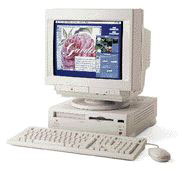 eBay in pretty much unknown condition. All I was told
was that it would boot to a blinking floppy disk icon.
eBay in pretty much unknown condition. All I was told
was that it would boot to a blinking floppy disk icon.
When I first turned it on, I knew it was going to be a project. The CD-ROM drive was bad. I realized that the hard drive was also bad. I had a spare CD-ROM drive which had only cost me a few dollars, so I installed that. After a long time searching, I found that a friend had a 2 GB IDE hard drive from a dead Power Mac 5500. I bought that from him and installed it in the 6205.
Back on eBay, I bought a Mac LC III, which had been advertised as having 12 MB of RAM. When I received it, I had a pleasant surprise - 32 MB of RAM and a 160 MB hard disk, all for under $15. I installed that RAM in the 6205.
I got an ethernet card for the LC PDS slots for free so I could hook it up to our cable modem. Lastly I installed Mac OS 9.
That one cost me $75 total. Not bad, since that is usually about what a base 6200 sells for. From this, you will see that sometimes making your own system from a pretty low-end model can be cost effective.
Of course you don't have to use a 6200, especially since they are considered "slow" Power Macs (although when hooked up to a cable modem, they suddenly get a lot faster) due to some issues that they have (I really don't see them being limited that much if you install the right upgrades).
Power Mac 7100
You may want to look into a Power Mac 7100 instead. These Macs have three NuBus slots, a special PDS HPV video card which displays thousands of colours at 800 x 600 and can be upgraded to display millions of colours at 1024 x 768. Some have an AV card instead of the HPV card, allowing you to import and export video.
The 7100 series also features a SCSI hard drive and CD-ROM, a much nicer looking case than the 6200, and 4 RAM slots.
7100s also feature similar price tags to 6200s. You can often get a base configuration model for under $50!
Upgrading the RAM will cost you more than the 6200, because the 7100 needs RAM to be installed in pairs of SIMMs. If you can get four 16 MB SIMMs, you will have 72 MB total RAM. Not bad for a six-year-old computer.
Next is the hard drive. Most came with either 250 MB or 500 MB hard drives. Obviously that isn't enough today with system software that takes up over 200 MB itself. eBay often has 1 GB hard drives for as little as $10 or $15. You can buy 2 GB for about $25-35 depending where you go.
The Mac OS
What system software should you install on your "new" Power Mac?
I find Mac OS 8.1 the fastest of all the 8.x operating systems (System 7.1.2 is no doubt the fastest OS on the Power Macs, but you should have 8.x to take full advantage of the PowerPC processor). Mac OS 8.6 is also fast and offers some additional features which I like.
OS 9 is a little slow, but it does offer the best compatibility with other programs. OS 9.1 can be installed only from the upgrade CD; the download version does not install (even on G3 upgraded NuBus Macs).
G3 Upgrades
Since I mentioned G3 upgrades, I will go over the $150 mark to briefly talk about them. G3 upgrades were some of the most popular upgrades for the NuBus Macs, and, in my opinion, Newer Technology made some of the best upgrades. If you really must have a G3 upgrade, try to find a clearance or used Newer card.
Sonnet is supposed to make some pretty good upgrades; you may also consider some of their models. These will cost you about as much as the computer - $200+ just for the upgrade card (which makes it more economical to buy a used G3, see Is it worth putting a G3 in an older Mac).
If you want a Mac for under $150, either a 6200 or a 7100 may be a good choice. Keep in mind these won't match G3s or G4s, though they do a good job for word processing, Internet needs, and many kids games. A 7100 can even play an MP3 file pretty well!
About LEM Support Usage Privacy Contact
Follow Low End Mac on Twitter
Join Low End Mac on Facebook
Favorite Sites
MacSurfer
Cult of Mac
Shrine of Apple
MacInTouch
MyAppleMenu
InfoMac
The Mac Observer
Accelerate Your Mac
RetroMacCast
The Vintage Mac Museum
Deal Brothers
DealMac
Mac2Sell
Mac Driver Museum
JAG's House
System 6 Heaven
System 7 Today
the pickle's Low-End Mac FAQ
Affiliates
Amazon.com
The iTunes Store
PC Connection Express
Macgo Blu-ray Player
Parallels Desktop for Mac
eBay

