
Apple Archive
OS X: The End of Tight Hardware Integration?
- 2001.04.06
Mac OS X is possibly the biggest change to the Macintosh ever. It marks the end of the standard Mac OS. It also marks the end of tight hardware-software integration.
If you remember, if you chose "About the Finder" back in System 6, it would tell you what System you were running, what version of the Finder you were running, and how much RAM you had.
System 7
System 7 introduced something new - when you chose "About this Macintosh", you got a box showing your machine. If you had a IIsi, that's what it would say: "Macintosh IIsi."
That's hardware-software integration. System 7 also let you have more than 8 MB of RAM; let you run many applications at once by default; separated extensions, control panels, and preferences folders; and allowed you to customize your Apple Menu easily.
Later on, you started getting extensions and control panels for
your specific model, which added things on to the standard Mac OS
that enabled you to use features of your computer. As the LC IIIs and Quadras started coming out, you would see
files called System Enablers, which told the OS a bit about your
computer and included a few 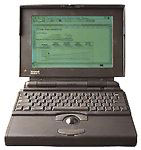 extra things for it to do (for instance, on the PowerBook 165, the system enabler file told the
system to disable 3D windows, because Apple found that on the 160's
LCD screen you could see some liquid-like movement in the 3D
windows that came with System 7)
extra things for it to do (for instance, on the PowerBook 165, the system enabler file told the
system to disable 3D windows, because Apple found that on the 160's
LCD screen you could see some liquid-like movement in the 3D
windows that came with System 7)
The Power Macs came with their own operating system, a temporary one called System 7.1.2. It was buggy, but it included QuickTime and CD-ROM support. To give you an idea of how fast 7.1.2 was on a then new 7100/66, it took just 13 seconds to start up.
System 7.5 came out with a little less and a little more integration. Gone was the machine identity in the "About this Macintosh" box (although I have seen it in some cases, such as the Mac IIfx and Classic II). There were many more features, such as more complicated desktop patterns, a hierarchical Apple Menu, a new Apple Guide, and lots more control panels and extensions.
Many of these supported only certain machines, like the Macintosh Processor Upgrade control panel. That only supported Quadra and Centris models that had been upgraded with the Macintosh processor upgrade card.
System 7.5 was buggy, so there were several updates. System 7.5.1 came in 1995 and shipped with the first PowerPC Performas. It was the first version of the system software to be called "Mac OS."
Mac OS 7.5.2 came with the PowerBook 190 and 5300 and the Power Mac 7200 line.
Mac OS 7.5.3 shipped as an update for anyone with 7.5, 7.5.1, or 7.5.2. It introduced TCP/IP and many other enhancements.
Mac OS 7.5.4 was under development but never shipped.
Mac OS 7.5.5 was available for those who had 7.5.3 installed. It was an update mainly for Power Macs (if you didn't have a PowerMac, it didn't do anything except remove some unnecessary system code) and shipped with later versions of the 6400 and early versions of the 6500.
In 1997, Mac OS 7.6 debuted with all of its bugs. A 7.6.1 update was quickly made available, which made 7.6 a very stable OS.
Mac OS 8
In just a few months, another new OS arrived.
A huge upgrade, Mac OS 8 included improved Internet access, the ability to set desktop pictures, and a whole new GUI. The GUI was based on the previous System 7 appearance, but it had a 3D look to its menus and folder icons.
Soon after, a much-needed 8.1 upgrade shipped. It fixed some problems opening folders, solved some problems with stability, and added the HFS+ file system. With the 8.1 update installed, Mac OS 8 was a very fast and stable operating system.
Mac OS 8.5 shipped with Sherlock, the Internet search detective. OS 8.5 also introduced themes, so you could save a total appearance on your computer. The 8.5.1 update came out to fix a few bugs in 8.5, and 8.6 came out in 1999, improving a few more things. OS 8.6 also improved USB support for the iMac and G3.
Mac OS 9
Later in 1999, Apple introduced Mac OS 9, dubbed "your Internet copilot." Shortly after, an update was issued to disable the "save memory content on sleep" feature which the iBook and new PowerBook G3 featured. This feature was buggy, and Apple addressed it specifically as it should have.
A 9.0.4 update shipped, disabling that and fixing some minor bugs. Recently, Mac OS 9.1 shipped to improve Classic Mac OS compatibility. OS 9.1 gave the Finder a new "Window" menu, displaying open windows. It also provided a new General Controls panel, which doesn't give the option to protect the Applications and System Folders. A new Startup Disk control panel appeared in 9.1, now supporting OS X disks. Mac OS 9.1 added a command-shift-delete Empty Trash command, and it also rearranged files on your hard drive so that it will be a little more compatible with OS X.
OS X
OS X is Apple's new operating system. It includes many new features, such as a new GUI called Aqua. It also has a new control panel. It is a single panel, as in Windows and System 6, where the controls actually appear in the same window. OS X also provides an Apple Menu, which you cannot customize, much like the Apple Menu of System 6 (you could customize the System 6 apple menu somewhat).
OS X provides solid/active window dragging and solid/active window resizing. It also provides fading menus. The solid/active window resizing doesn't work very well, not even on a fast G4. It would be nice if you could turn that off, as well as the fading menus, which get in the way of some things. OS X needs work in this area.
OS X also offers something not seen in many operating systems, preemptive multitasking. Imagine launching several programs at once! In the old Mac OS, that wasn't possible. Mac OS X gives you protected memory, which means if one program crashes, you won't have to restart the whole computer, like you did with the older Mac OS.
There is a new type of crash. You may experience a kernel panic. You will notice that your desktop gets interrupted with lines of text, and you are no longer able to do anything on your computer. This is the equivalent of a bomb dialog in Mac OS 9.
Mac OS X does not feature tight hardware-software integration like every version of the Mac OS since System 6. Control panels just for PowerBooks, extensions just for the graphics cards in G4s, and support for the volume keys on the PowerBook keyboards.
This is a real step backward, as one of the main advantages of the Mac OS was that it knew your hardware, and it contained features to specifically support your system.
OS X is an ultramodern operating system. I believe that Apple is going in the right direction, but it still needs work - especially in the hardware-software integration area and in the interface speed.
I am really looking forward to July, when Apple begins installing OS X on their new computers.
About LEM Support Usage Privacy Contact
Follow Low End Mac on Twitter
Join Low End Mac on Facebook
Favorite Sites
MacSurfer
Cult of Mac
Shrine of Apple
MacInTouch
MyAppleMenu
InfoMac
The Mac Observer
Accelerate Your Mac
RetroMacCast
The Vintage Mac Museum
Deal Brothers
DealMac
Mac2Sell
Mac Driver Museum
JAG's House
System 6 Heaven
System 7 Today
the pickle's Low-End Mac FAQ
Affiliates
Amazon.com
The iTunes Store
PC Connection Express
Macgo Blu-ray Player
Parallels Desktop for Mac
eBay

