
Every few years some publication decides to have a variation on a top ten computing failure list. Invariably both the Lisa and the Newton make it on that list with many guffaws about the Lisa’s US$10,000 price.
Sometimes the Xerox Star is also added to the list. At least, it’s in great company.
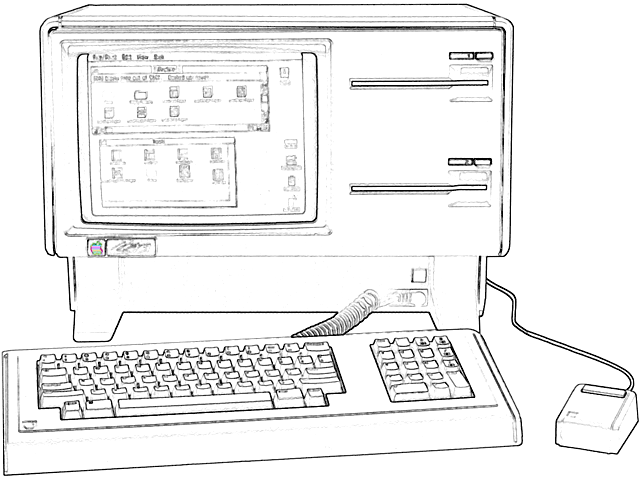
Lisa’s DNA
The authors of such tripe fail to realize just how much of the work begun on Lisa is still with us today. Lisa’s DNA is present in today’s machines. Just as a pair of eyes, a spine, and opposable thumbs bestowed great advantages to creatures bearing them, so do mice, icons, windows, pull down menus, and the like to modern computers.
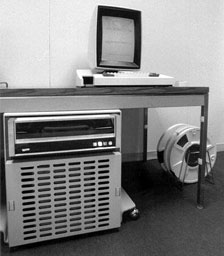 It is true that a lot of these ideas came from the Xerox Alto (left), but the folks who designed Lisa expanded them far beyond what PARC had achieved. If I had to venture a guess, I’d say it’s because a lot of the folks from PARC left to work on Lisa.
Some would call these ideas memmes, but I prefer genes or bits of DNA, if you will allow me to stretch the metaphor. Computer designs also evolve over time through the efforts of computer scientists.
Woz’s great invention was building a hobbyist computer with a full keyboard that worked with your TV. This was in the era where a personal computer was barely a box with toggle switches and blinking LEDs. So that’s an early bit of DNA right there.
Every computer was built upon the ideas of the state of the art at the time, all the way back to the Univac, which in turn took its ideas from Bletchley Park’s Enigma breaking Bombes, and Colossus. The ideas that Alan Turing, John von Neumann, Charles Babbage, et al. came up with are the core DNA of all digital computers.
Each new generation built upon the DNA of the last.
Lisa as a Workstation
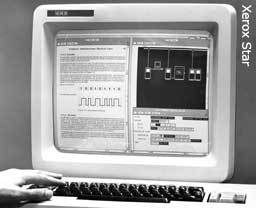 Lisa, like the Xerox Star (right), was indeed an extremely expensive workstation when compared to your run-of-the-mill personal computer. It’s a workstation (though that word would not come into computing vocabulary until much later) because Lisa was closer to a minicomputer in design while intended for a single user. It took a lot of ideas from Unix, as well as from the Xerox Alto, and hardware design from minicomputers such as the PDP line. Most personal computers of the era were 8-bit CP/M machines, which the IBM PCs and XT were busily killing off, or Commodore 64s and the like, and cannot be called workstations.
Advertising from Apple called both the original Mac and the Lisa “32 bit Super-Micros” as a nod to this factoid. The main reason that rags seeking filler articles call the Lisa a failure is its price tag. Well, that and the failure prone Twiggy drives.
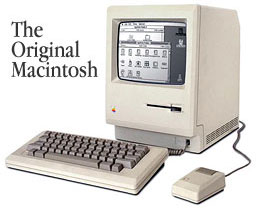
The price was high because of the memory requirements and the extra hardware. It’s notable that the Mac was able to perform many of Lisa’s functions with only 1/8th the memory. However, the original Mac truly was a personal computer (a microcomputer) and cannot be called a workstation.
I would not state that Lisa was perfect. There’s no such thing. Every machine and every computer architecture has its share of flaws. I can attest to the fact that there are a lot of inefficiencies and weird code in Lisa’s operating system, because I’ve encountered them while working on the emulator. I’m sure that at the time it was being designed, the folks working on it did the best that they could, gathering the best DNA from other state of the art machines.
GEOS
As an aside, Berkeley Softworks’ GEOS was a perfectly fine Macintosh-like OS for the Commodore 64. But, like the Mac, it was crippled by lack of memory and could only run one program at a time. Even so, it had an impressive array of software for it: a word processor, a spreadsheet, an address book, and even a desktop publishing program that could print to an Apple LaserWriter were available.
While fans of GEOS would say GEOS copied the Mac, it’s more accurate to say that it got a lot of Lisa’s DNA, including a the not-so-well-known copy protection called serializing. It would write its serial number the first time you ran a program on your computer and prevent other copies of GEOS from running it. For example, the very first time you ran GeoWrite, GEOS would write its serial number on the GeoWrite application. If you then took GeoWrite to your friend’s house who had GEOS, her copy of GEOS would refuse to run it! This was the same exact method Lisa used!
The First Office Suite
Let’s play a bit of a guessing game. Ask any person who is computer literate the following question: Name the first GUI office suite that had a word processor, a spread sheet, a database, and a project planning application. Did they guess Microsoft Office? No surprise there.
The real surprise is that Lisa had these as well as graphing, drawing, and terminal programs back in 1983. Yes, you could copy and paste parts of documents across modules. That’s right, parts of your spreadsheet could be pasted into your text document, along with data from your database, as well as charts and graphs. This was all before OLE, later to be renamed ActiveX, was even a gleam in Bill Gates’ eye.
Gee, I wonder where he might have gotten that bit of DNA?
More Lisa DNA
If you’re one of the 99.999% of all computer users, you’re probably using these kinds of tools today – whether you run OS X, Mac OS 9, KDE, GNOME, or some form of Windows as your desktop. Lisa’s DNA is all over them.
 I believe that Microsoft didn’t copy the Mac; it copied Lisa instead. If you look at Lisa’s windows, there’s an icon in the left corner of the title bar. The same is true of Windows windows, only they turned it into a menu. If you double-click that icon, it closes the window. Another bit of DNA.
On Windows 3.1, if you minimized an application, it would shrink to an icon on the desktop, as there was no task bar – the same exact way as on Lisa.
 The Windows 3.1 hourglass cursor also exists on Lisa and the Xerox Star. (The Mac swapped it for a watch icon and later replaced it with the NeXTstep beachball cursor.) Yet more Lisa DNA.
Cooperative multitasking on Windows 1.x-3.1 and the classic Mac OS? More DNA from Lisa.
It makes sense that Apple would use the same kind of multitasking on Mac OS as on Lisa, but why did Microsoft do the same thing, when older operating systems (such as Unix) had used preemptive multitasking since the late 1970s?
Lisa was one of the first machines to have a software controlled power supply. Mac’s adopted that only after the Mac II line. PCs didn’t until 1994.
Today we rely on sleep/standby/hibernate modes instead of shutting down our computers. But perhaps Lisa had something to do with that too. When you powered off Lisa, it would save all of your open files and remember where they were. When you turned Lisa back on, those documents would be restored. Not quite sleep mode, but close.
Screen saving? Also on Lisa. Lisa would dim the display when it was idle. PCs and Macs of that era didn’t.

 Fun experiment: Fire up my Lisa Emulator and switch the display to raw mode (Lisa pixels aren’t square), you can see that the arrow cursor is nearly identical, pixel for pixel on all versions of Windows (although Microsoft decided to make their cursor white). I’m sure that if I were able to do the same on a Xerox Alto or Star, I’d see nearly identical mouse cursors there.
A final strand of DNA as food for thought:
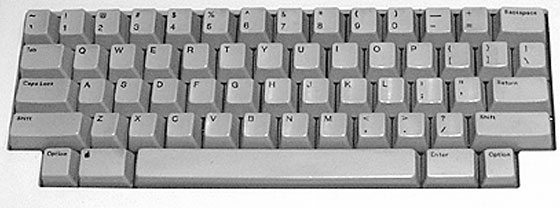
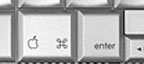 If you own just about any Apple notebook computer, take a look at the keyboard. In my own collection, from my PowerBook 165, Duo 230, and 5300, to my modern MacBook Pro, they all have a strange little square key labeled “Enter” next to the Apple key. None of my Apple desktop keyboards seem to have this key – except for one: Lisa! (It’s not quite identical. Lisa gives up it’s right Apple key for the enter key, while the MacBooks give up their second option key.)
If Lisa were a failure, it would have won a Darwin Award. Instead it has produced many successful offspring. Unless you’ve printed this article, you’re reading this on one of Lisa’s descendants.
Further Reading
- Colossus: The Secrets of Bletchley Park’s Code-breaking Computers, currently $26.55 from Amazon.com
- 1984 Macintosh Introduction Add, Mac Mothership. Refers to 32-bit SuperMicros
- Busy Being Born, Andy Hertzfeld, Folklore. The story behind the Lisa GUI.
- GEOS Copy Protection Eliminated
- Lisa Tool De-Serialization, David T. Craig, Dartmouth
- Prototype Lisa Keyboard. The prototypes didn’t have the Enter key.
This article copyright ©2007 by Ray Arachelian.
Keywords: #applelisa
Short link: http://goo.gl/4kHBvd
searchword: lisadna
